Effective Claude Code Usage
$ claude
✓ Claude Code

# Your AI pair programmer
# in the terminal

> How can I help?
What you’ll learn
- Agents vs chatbots — what Claude Code actually is
- Tools, permissions & sandboxing — capabilities and safety boundaries
- Skills & slash commands — reusable playbooks and session control
- Context window — what fills it and how to manage it
- CLAUDE.md, auto memory & hooks — durable context and enforcement
- Subagents, background agents & workflows — parallel and orchestrated work
- Planning mode — explore before you edit
- Prompting — intent over instructions
- Git worktrees — parallel Claude sessions
Goal · turn Claude Code from a smart autocomplete into a capable cognitive partner for complex engineering tasks.
Prerequisite · Claude Code installed; you can run claude in a terminal.
What Is Claude Code?
“It’s not a chatbot in a terminal. It’s an agent that reads, writes, searches, and executes — and loops until the task is done.”
Claude Code is a CLI Agent
CLI-first · runs in your terminal, next to your shell, files, and Git history. Also available as desktop app, IDE extensions (VS Code, JetBrains), and web app.
Agentic · not one-shot Q&A — loops: perceive → plan → act → observe → repeat
Tool-using · reads files, writes code, runs bash, searches the web, spawns subagents, and can run workflows when enabled
Key insight · the model decides which tools to use, in what order, and how many times.
$ claude "add unit tests
  for src/auth.ts"

● Reading src/auth.ts
● Scanning test patterns
● Writing tests/auth.test.ts
● Running: npm test

✓ 12 tests passing
Agents vs. Everything Else
“The difference between a chatbot and an agent is the difference between giving advice and doing the work.”
Intelligence Spectrum
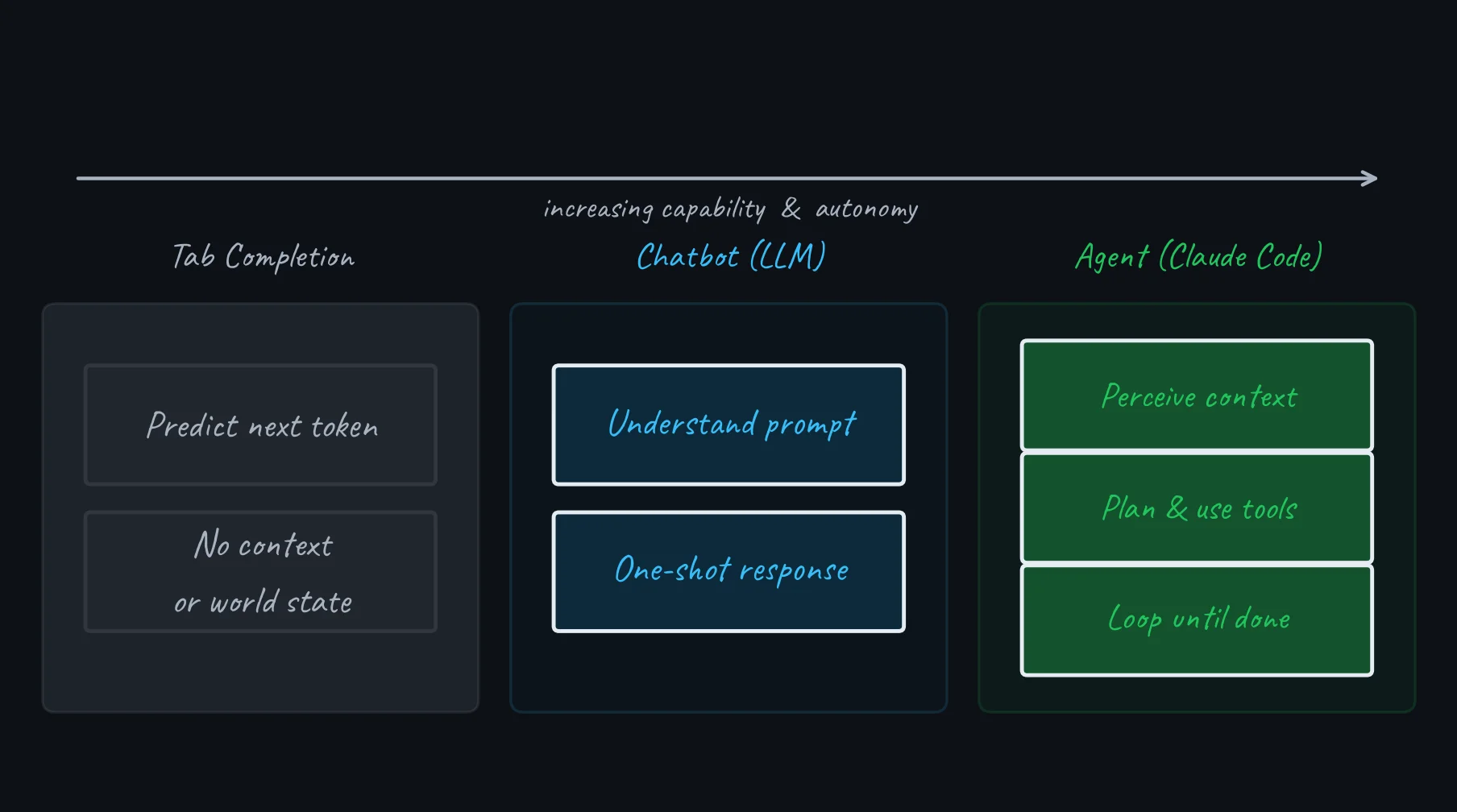
ReAct Agent Loop
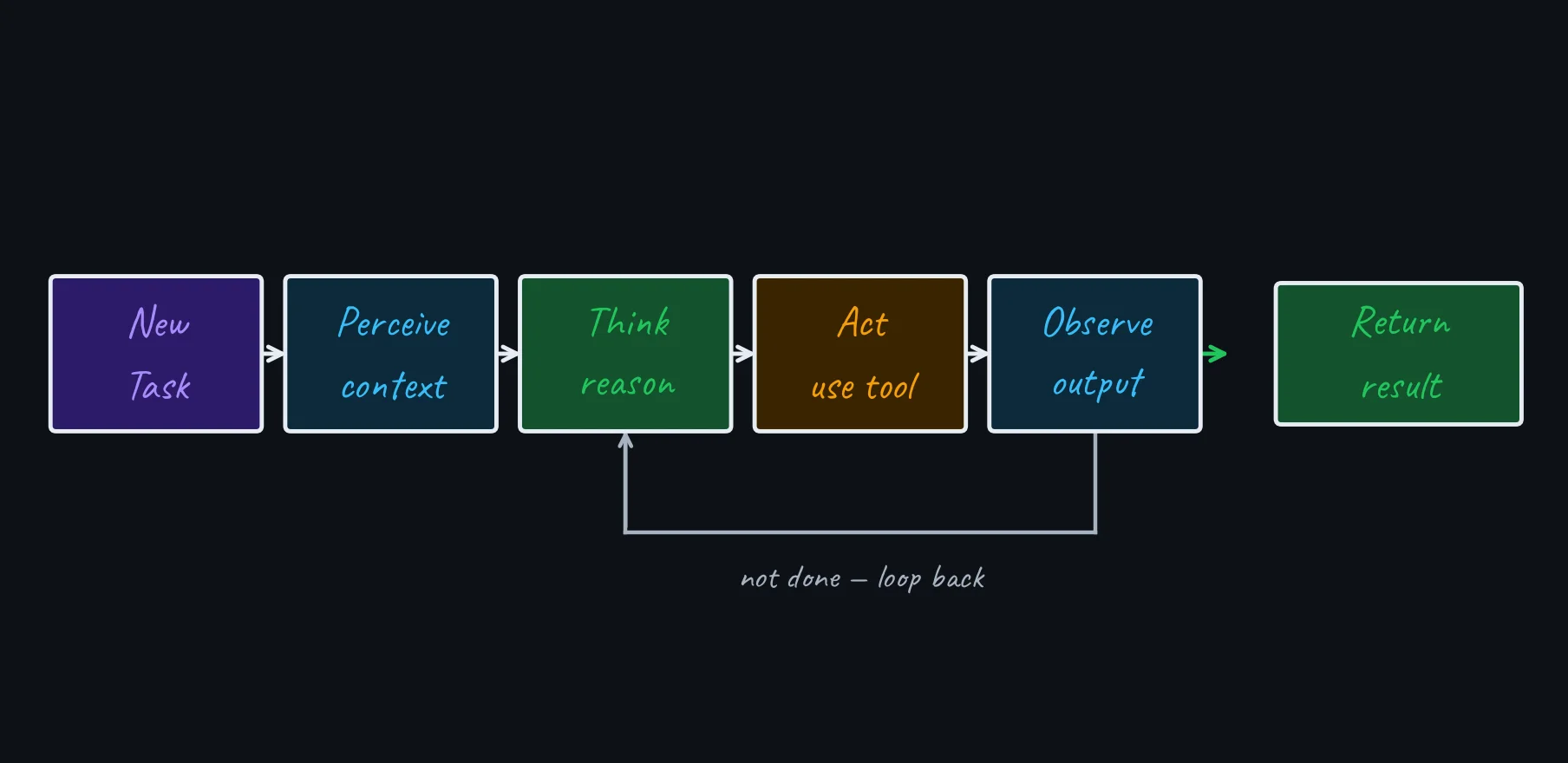
Claude Code can run many tool calls in one turn: read code, inspect test output, make changes, and re-run checks before it stops.
Tools & Capabilities
“A tool is a function the model can call. The model decides when — and how many times.”
Tool Ecosystem
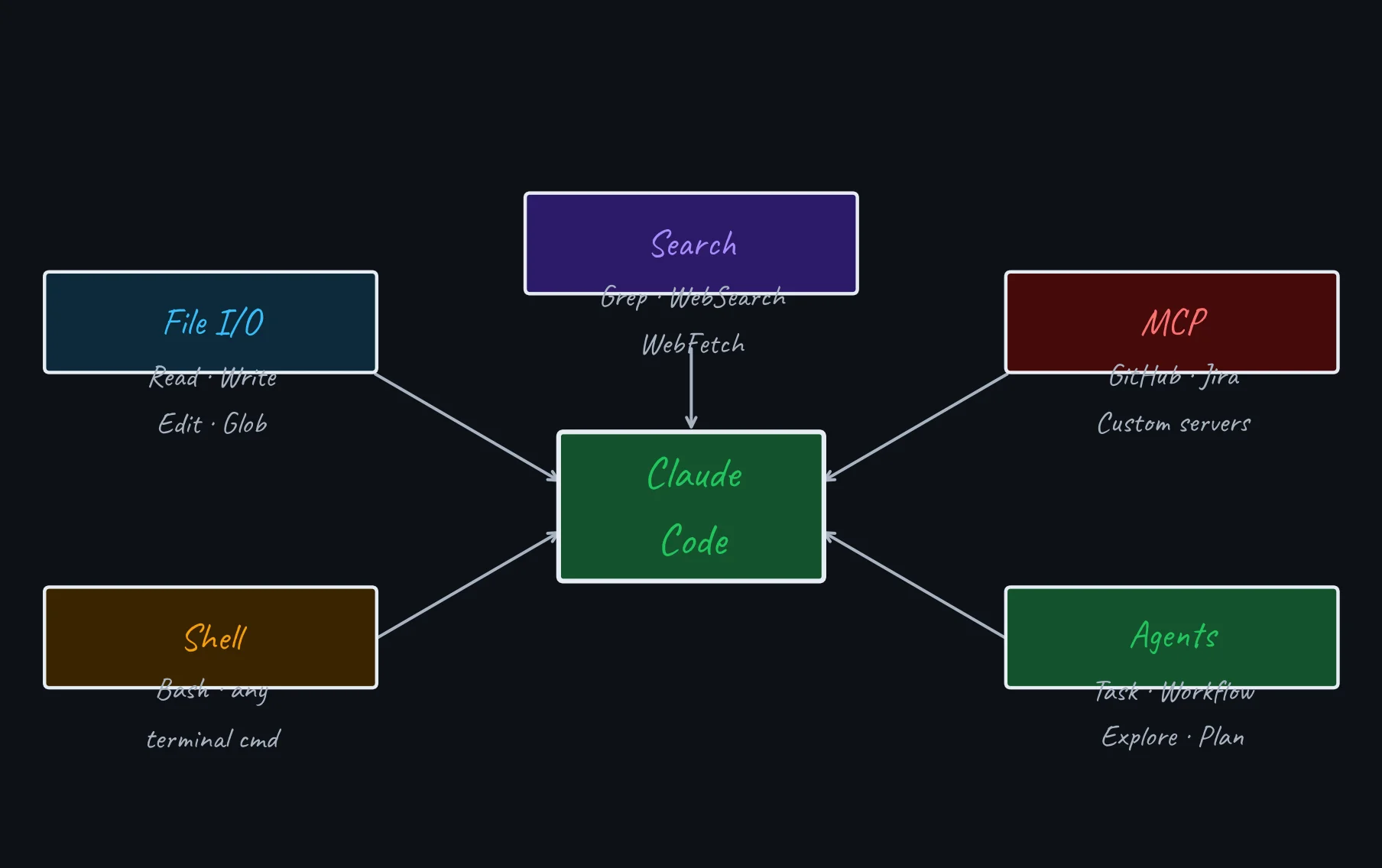
Tool Categories
| Category | Enables |
|---|---|
| File I/O | Read any file; create or surgically modify code |
| Pattern Search | Find files by name; search content by regex |
| Shell | Run tests, git, npm, docker — any terminal command |
| Web | Fetch docs, read changelogs, search answers |
| Agents | Spawn subagents, isolate context, and run workflow orchestration when available |
| MCP | GitHub PRs, Jira tickets, Postgres, and more |
Permissions + sandboxing · prompts depend on the active permission mode and rules. Sandboxed Bash can run automatically inside OS-enforced boundaries; explicit deny rules still apply. Configure both with /permissions and /sandbox.
Choose a Permission Mode
| Mode | Runs without asking | Best fit |
|---|---|---|
| Manual | Reads only | Getting started; sensitive work |
| Accept edits | Reads + file edits | Iterating on code you will review |
| Plan | Reads only | Explore before implementation |
| Auto | Classifier-approved actions (still blocks risky ones) | Default on Pro/Max/Team; long tasks |
| Don’t ask | Only pre-approved tools | Locked-down CI and scripts |
| Bypass | Everything | Isolated containers or VMs only |
Defense in depth · permission rules decide what Claude may attempt; the sandbox enforces filesystem and network boundaries for Bash. In auto mode a classifier model reviews actions in your place — it cuts prompts but does not replace your review of sensitive work.
Sources: Permission modes · Sandboxing
Skills & Slash Commands
“The
/menu is a launcher. The action type tells you how Claude will execute it.”
/ Actions — Know What You Are Running
The / menu combines built-in commands, bundled skills, workflows, plugin actions, and MCP prompts. Skills are reusable instructions that load on demand; many can activate from their description, but /verify and /code-review run only when you invoke them.
| Action | Kind · purpose |
|---|---|
/code-review |
Skill · correctness review |
/simplify |
Skill · apply cleanup fixes |
/verify |
Skill · run and observe the change |
/run |
Skill · launch and drive the app |
| Action | Kind · purpose |
|---|---|
/deep-research |
Workflow · cited research |
/security-review |
Built-in · audit branch diff |
/init |
Built-in · generate CLAUDE.md |
/review |
Built-in · fast, read-only PR review |
Install-dependent · availability varies by version, plan, platform, plugins, and MCP servers. Use /help for commands and /skills for loaded skills.
Slash Commands — Session Control
Session & Context
| Command | Purpose |
|---|---|
/clear |
Reset conversation history |
/compact |
Compress history, keep summary |
/context |
Inspect context usage and heavy inputs |
/rewind |
Restore or summarize from a checkpoint |
/goal |
Keep working until a condition holds |
/usage |
Show usage and limit breakdown |
Modes & Control
| Command | Purpose |
|---|---|
/plan |
Enter planning mode |
/permissions |
Manage allow, ask, and deny rules |
/sandbox |
Configure OS-enforced Bash isolation |
/model |
Switch Claude model |
/help |
List all commands |
/workflows |
Watch live workflow progress |
Commands move fast · use /help as the source of truth for your install. /cost and /stats are current aliases for /usage.
Context Window
“The context window is finite. What’s in it decides what Claude can reason about.”
What Fills the Context?
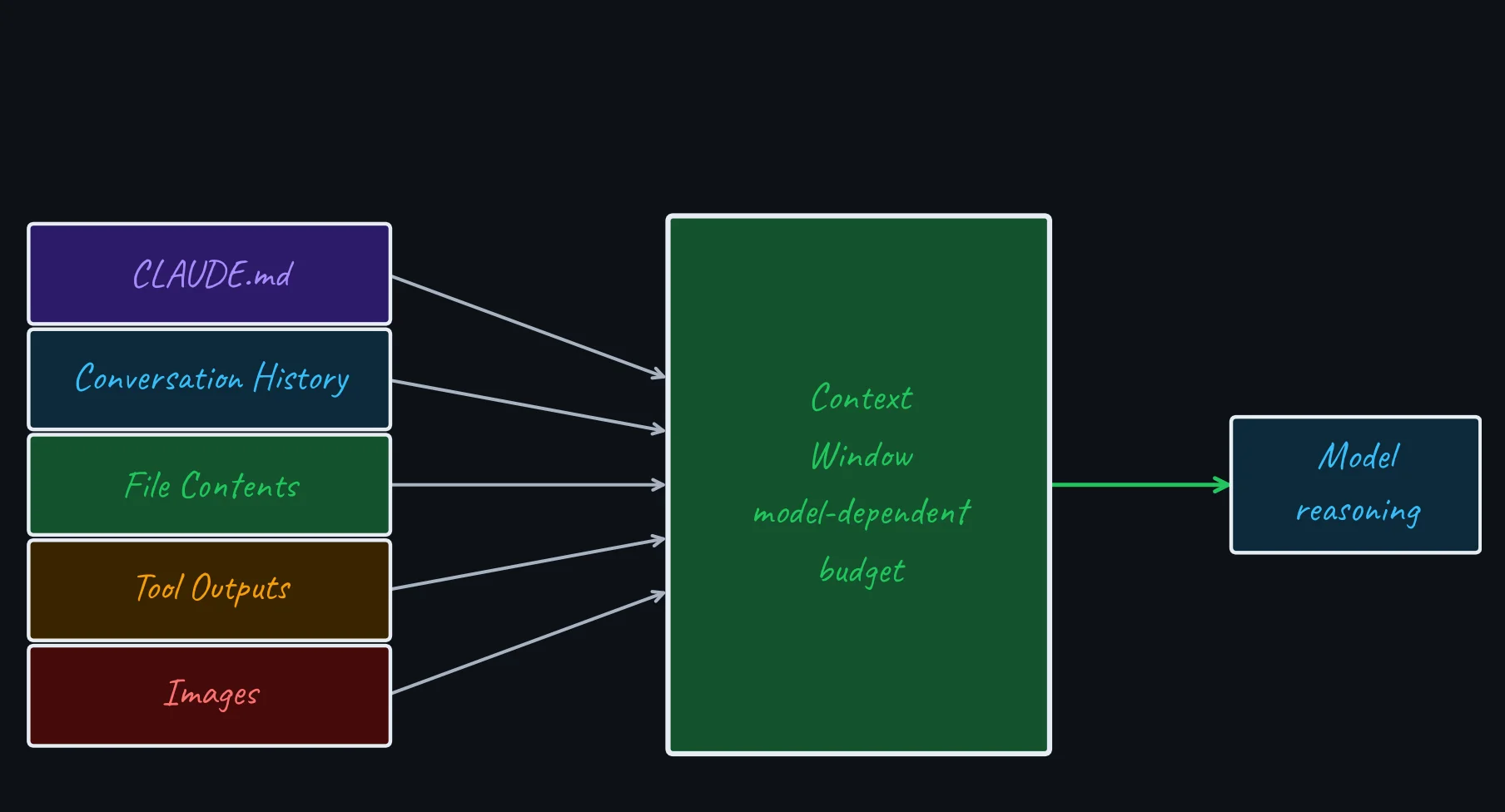
Fills fast · large tool outputs (full files, verbose logs) consume tokens rapidly.
Fix · Claude can compact long sessions, but you still control the inputs. Use /compact, limit reads to relevant files, and trim verbose bash output.
CLAUDE.md & Auto Memory
“CLAUDE.md is durable instruction context; auto memory is Claude’s local notebook.”
How CLAUDE.md Is Loaded
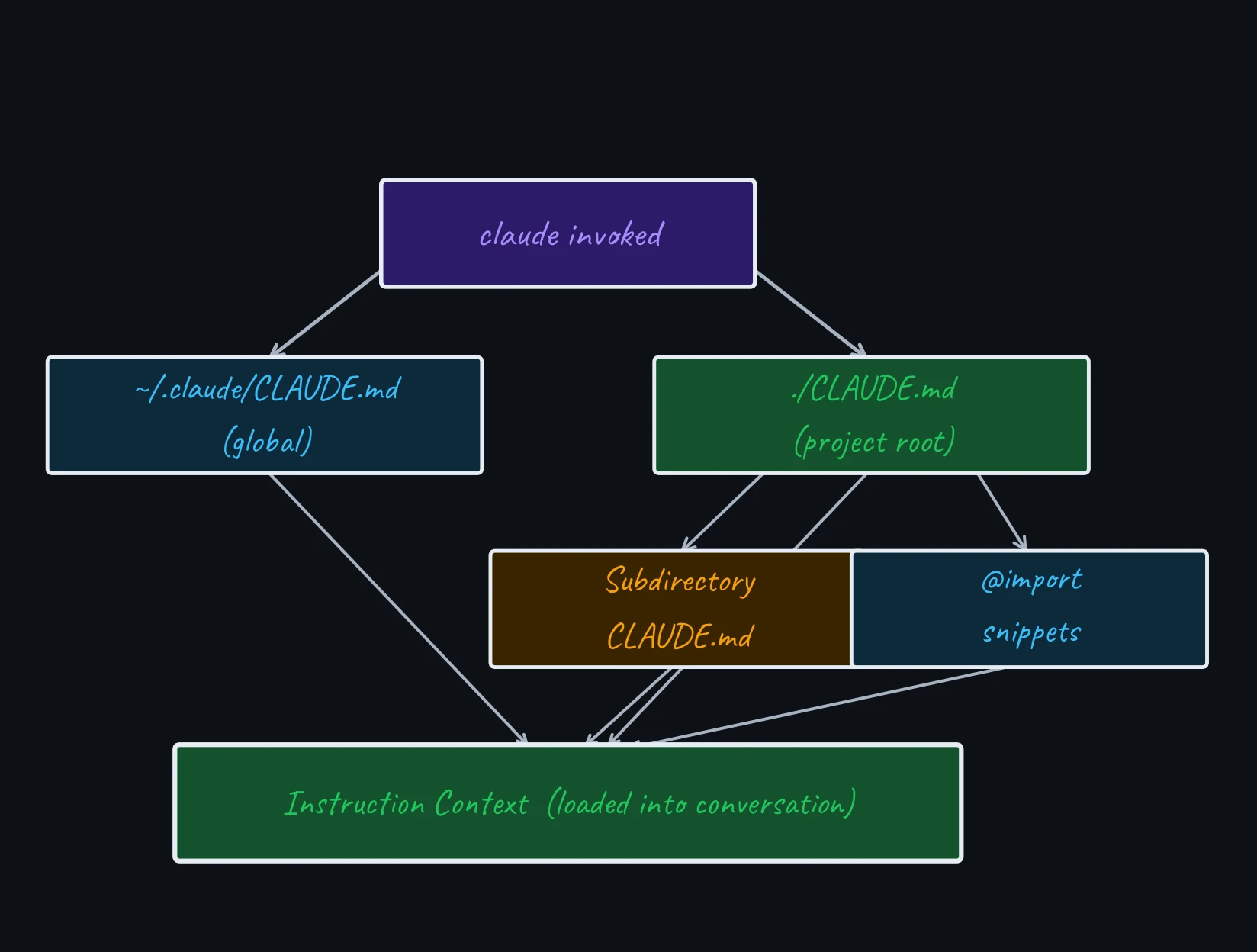
CLAUDE.md Anatomy
# My Project CLAUDE.md

## Stack
TypeScript monorepo, Node 22, pnpm

## Conventions
- ESM only (no require())
- Tests: Vitest + @testing-library
- Branch: feat/<ticket>-description

## Commands
- Test:  pnpm test
- Build: pnpm build

## Never
- Push directly to main
- Commit .env files
Auto-generate
Run /init in any repo — Claude inspects the codebase and writes a CLAUDE.md for you. Edit it to add conventions and “never do” rules.
Keep it lean · include only commands, conventions, decisions, and gotchas Claude cannot infer from the repo. Use /context to confirm the file loaded.
Auto memory · Claude saves reusable learnings per repository and shares them across its worktrees. Audit, edit, or disable the plain Markdown notes through /memory.
Hooks — Automated Validation
# .claude/settings.json
{
  "hooks": {
    "PostToolUse": [{
      "matcher": "Edit",
      "hooks": [{
        "type": "command",
        "command": "pnpm lint"
      }]
    }]
  }
}
What hooks do · run shell commands automatically at lifecycle events — no per-prompt reminder needed.
Key events · PreToolUse · PostToolUse · Stop · UserPromptSubmit — and more
Use cases · lint after edits · run typecheck before stopping · block risky bash commands · log file writes
Keep them scoped · prefer narrow matchers and non-mutating checks unless automatic edits are truly intentional.
Memory Is Context, Not Enforcement
CLAUDE.md · you write durable project instructions: non-obvious commands, conventions, workflow rules, architecture decisions, and gotchas.
Auto memory · Claude writes local, per-repository learnings. Only the first 200 lines or 25 KB of its MEMORY.md index load at startup; topic files load on demand.
Neither is a hard guardrail · concise, specific instructions improve adherence, but use permission deny rules or hooks when an action must be blocked or a check must always run.
# In a Claude Code session
> /context
  Memory files:
  + ~/.claude/CLAUDE.md
  + ./CLAUDE.md

> /memory
  Project instructions
  Auto memory: on
  Open memory folder

# Review notes like code:
# prune stale or conflicting facts
Source: Claude Code memory documentation
Subagents & Workflows
“Subagents handle parallel work. Workflows are for the cases where simple fan-out is not enough.”
Subagent Orchestration
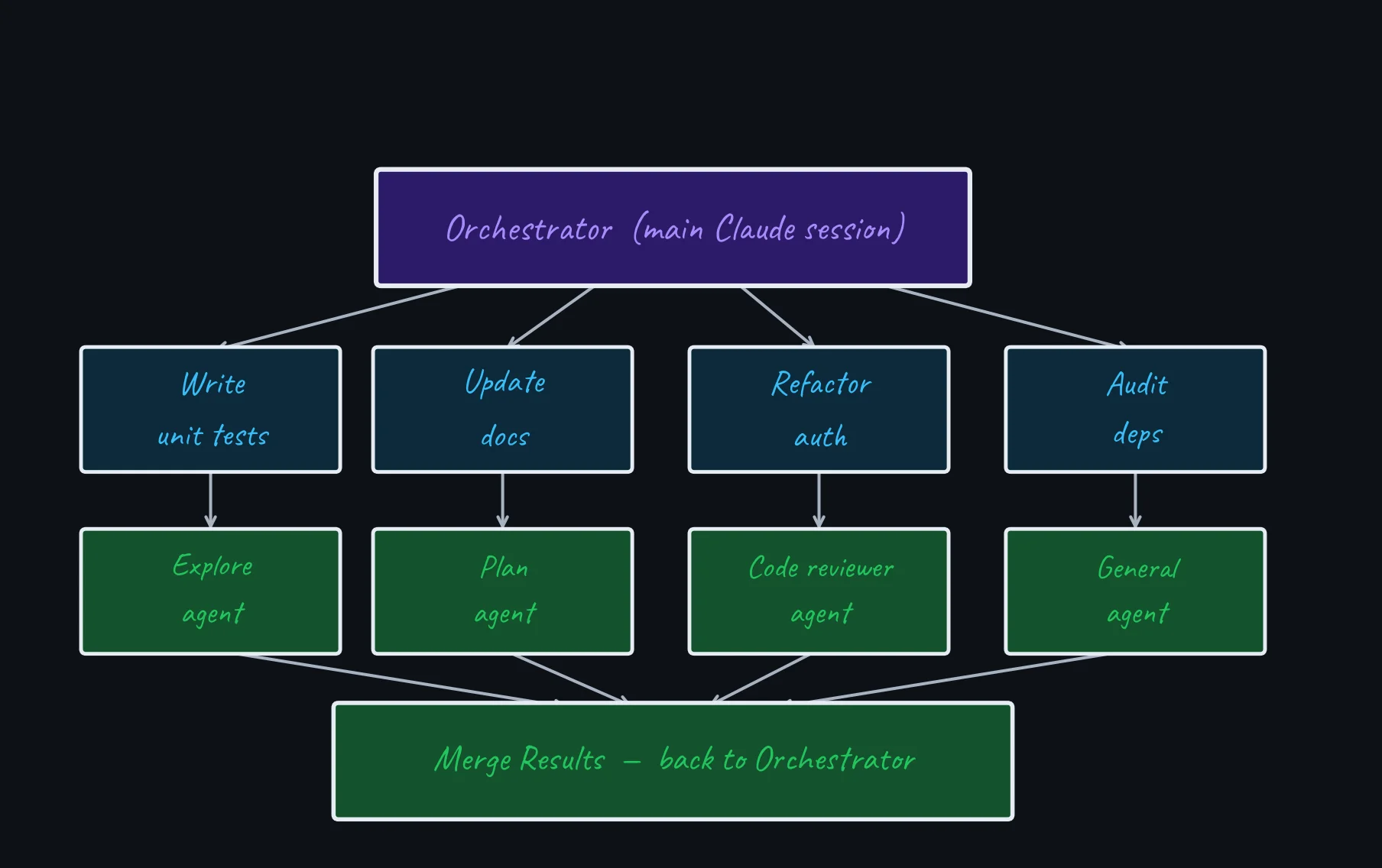
Choose the Right Parallel Primitive
Subagents
Focused side tasks inside one session. Use when exploration or logs would clutter the main context; results return as a summary.
Background agents
Independent sessions you dispatch and monitor with claude agents. Useful when you want to hand off several tasks and check back later. Research preview.
Agent teams
Peer sessions with a shared task list and direct messaging. Use only when workers must coordinate with each other. Experimental and disabled by default.
Dynamic workflows
Scripted orchestration for many agents, cross-checks, resumability, or repeatable control flow. Use after a task outgrows a few subagents.
Default · start with one agent. Explicitly ask for a subagent, worktree isolation, a background session, a team, or a workflow when that coordination model materially helps.
Source: Run agents in parallel
Workflows — Advanced Orchestration
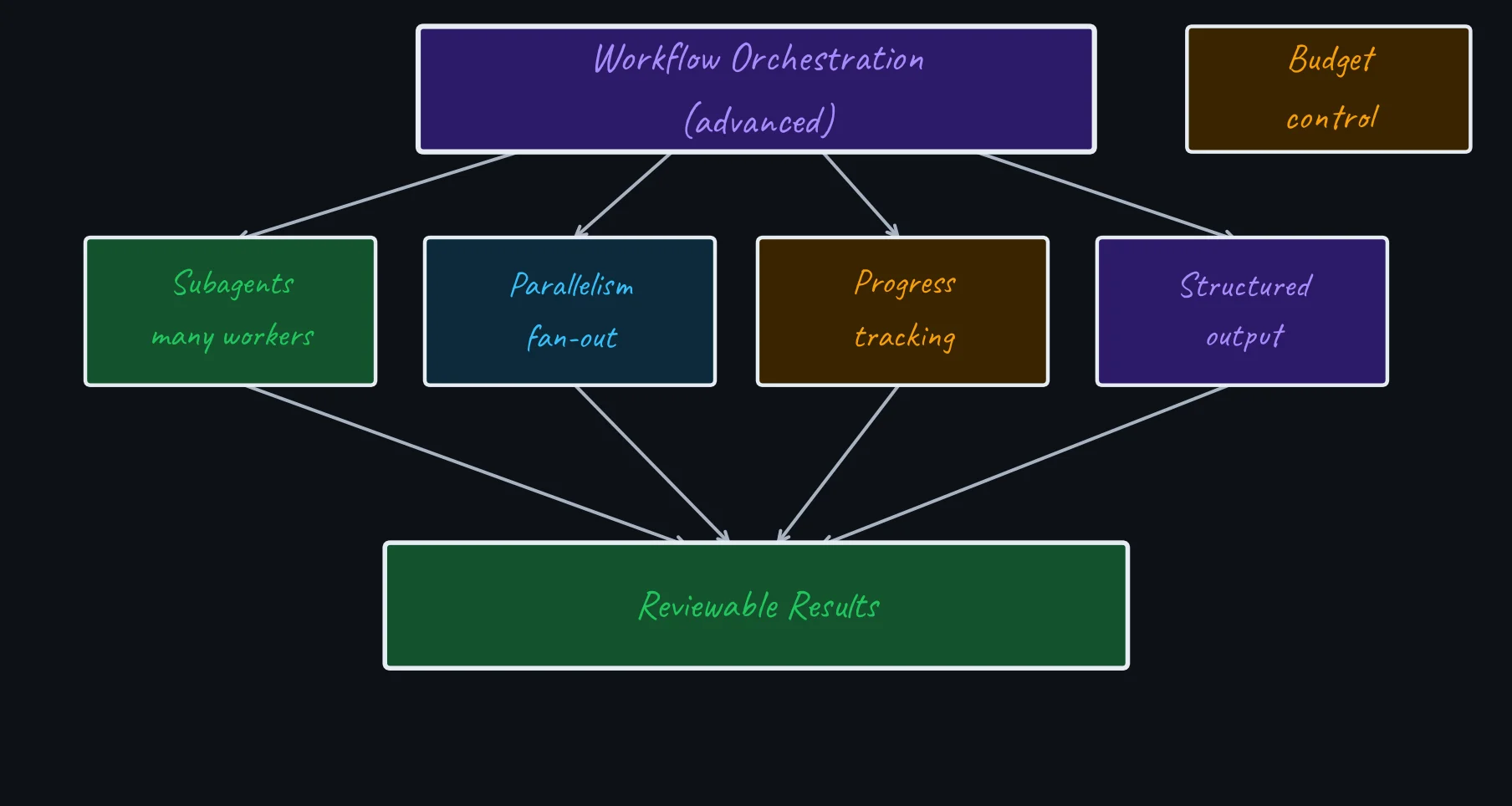
Advanced automation · dynamic workflows move orchestration into a readable JavaScript script that runs in the background. Use /workflows to inspect progress and save a successful run for reuse.
Workflow Patterns — Use Sparingly
| Pattern | Use when | Simpler alternative |
|---|---|---|
| Adversarial verify | A high-risk review needs independent challenge | One subagent + manual review |
| Judge panel | Several viable designs need comparison | Ask for tradeoffs first |
| Loop-until-dry | You need repeated search until no new findings | One targeted verification pass |
| Pipeline | Many items need the same multi-stage treatment | Script + one Claude pass |
Rule of thumb · use a few subagents for turn-by-turn delegation; use a workflow when the plan itself needs repeatable loops, branching, cross-checking, or dozens of workers.
Source: Dynamic workflows
Planning Mode
“Explore first. Edit second.”
Planning Mode Workflow
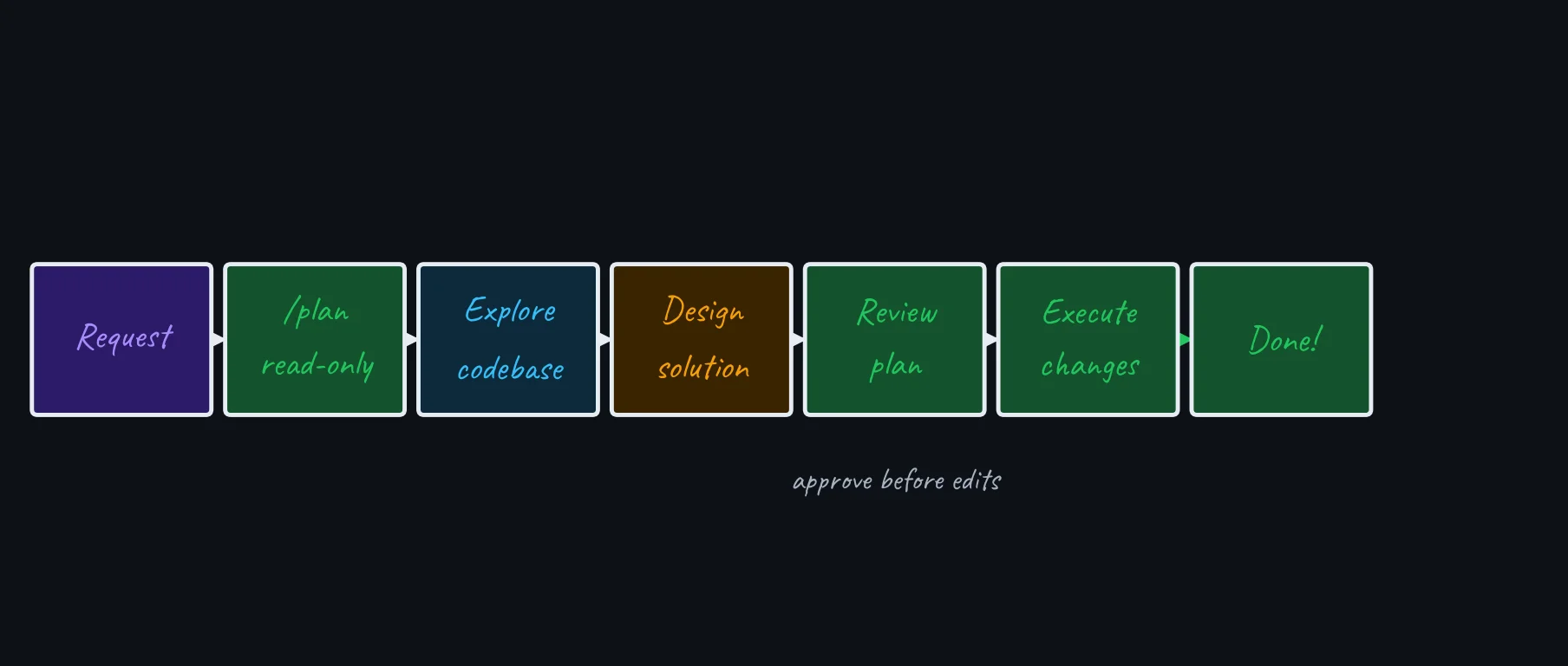
In planning mode Claude reads files and proposes an approach before edits happen. Start it with /plan or claude --permission-mode plan, then review the plan before execution.
When Planning Mode Pays Off
| Situation | Without Planning | With Planning |
|---|---|---|
| Refactor across 20 files | Broken imports, partial changes | Coherent strategy, clean execution |
| Add auth to existing app | Picks wrong pattern for codebase | Existing patterns understood first |
| Multi-service change | Inconsistent API contracts | All surfaces identified upfront |
| Mysterious bug | Treats symptoms, not cause | Root-cause analysis before editing |
Rule of thumb · plan when the approach is uncertain, the change spans multiple files, or the code is unfamiliar. If you can describe the diff in one sentence, direct execution is usually enough.
Pro tip · front-load clarity: state intent, constraints, and acceptance criteria upfront. Let Claude draft the plan. Approve it or give one round of feedback — then execute.
Keep the Blast Radius Small
Before broad edits
- Use
/planfor cross-file changes - Start a worktree for parallel sessions
- State files, commands, and acceptance criteria
- Ask for a diff summary before commit
Before accepting work
- Inspect
git diff - Run tests and lint
- Check generated artifacts
- Review the PR like any teammate’s work
Principle · let Claude move quickly inside boundaries you can verify.
Delegate Intent, Verify Work
“Claude Code is an execution engine. Give it intent, constraints, and a finish line; then verify what changed.”
Define the What, Not the How
Over-specified
“First read auth.ts. Then check the test file. Then look for mocks. Then write a test for login using the existing mock pattern.”
Step-by-step instructions limit Claude’s ability to explore and adapt.
Intent + acceptance criteria
“Add unit tests for the auth module. Done when: all public functions covered, edge cases tested, conventions followed, pnpm test passes.”
Define what done looks like. Claude figures out how.
The prompting rule that still matters most · Claude can explore the codebase, choose tools, and loop on failures, but it cannot read your mind. State your definition of done, then verify those criteria before accepting the result.
Mental model · delegate the work, but keep ownership of the result. Inspect the diff, run checks, and review the PR before merging.
Git Worktrees
“When two Claude sessions edit the same files, you don’t get double the speed — you get merge conflicts. Worktrees give each session its own universe.”
Why Parallel Sessions Need Isolation
Without worktrees
- Two sessions share the same working directory
- Uncommitted changes bleed across sessions
- One context reset can overwrite the other’s work
- Stash/pop gymnastics just to switch tasks
With worktrees
- Each session gets its own directory and branch
- Edits, builds, and tool calls are fully isolated
- Shared commit history and remote connections
- Merge when both are done — on your schedule
Key insight · a git worktree is a second checkout of the same repo — same .git/ database, different working tree. Claude Code manages them with a single flag.
Worktrees — How They Work
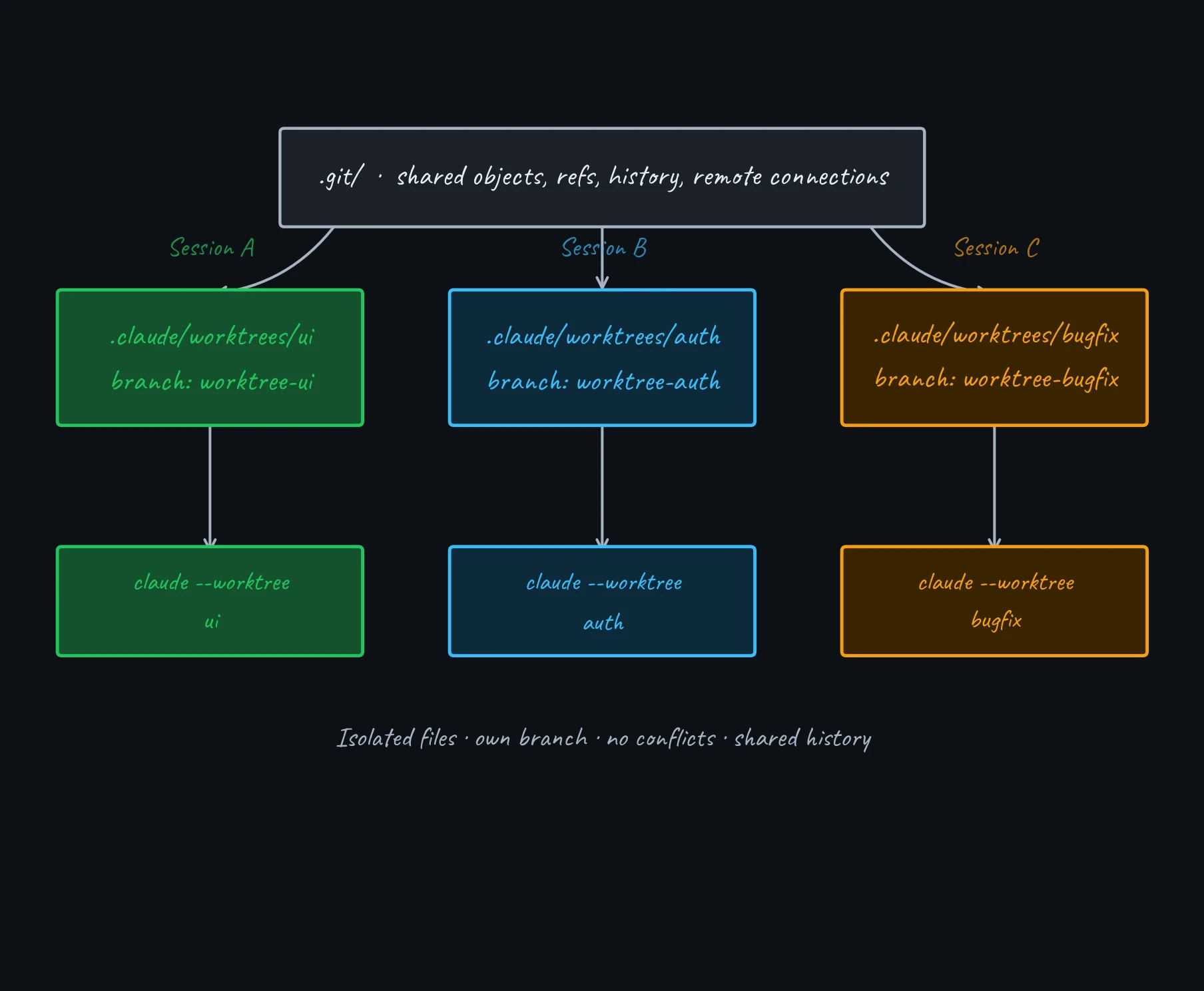
Usage · claude --worktree feature-auth creates an isolated worktree and starts Claude in it. -w is the short alias.
Pro tip · add .claude/worktrees/ to .gitignore. Use .worktreeinclude to copy selected gitignored setup files such as .env into new worktrees.
Summary
“Claude Code is most powerful when you treat it as a partner, not a search engine.”
Effective Usage: Mental Model
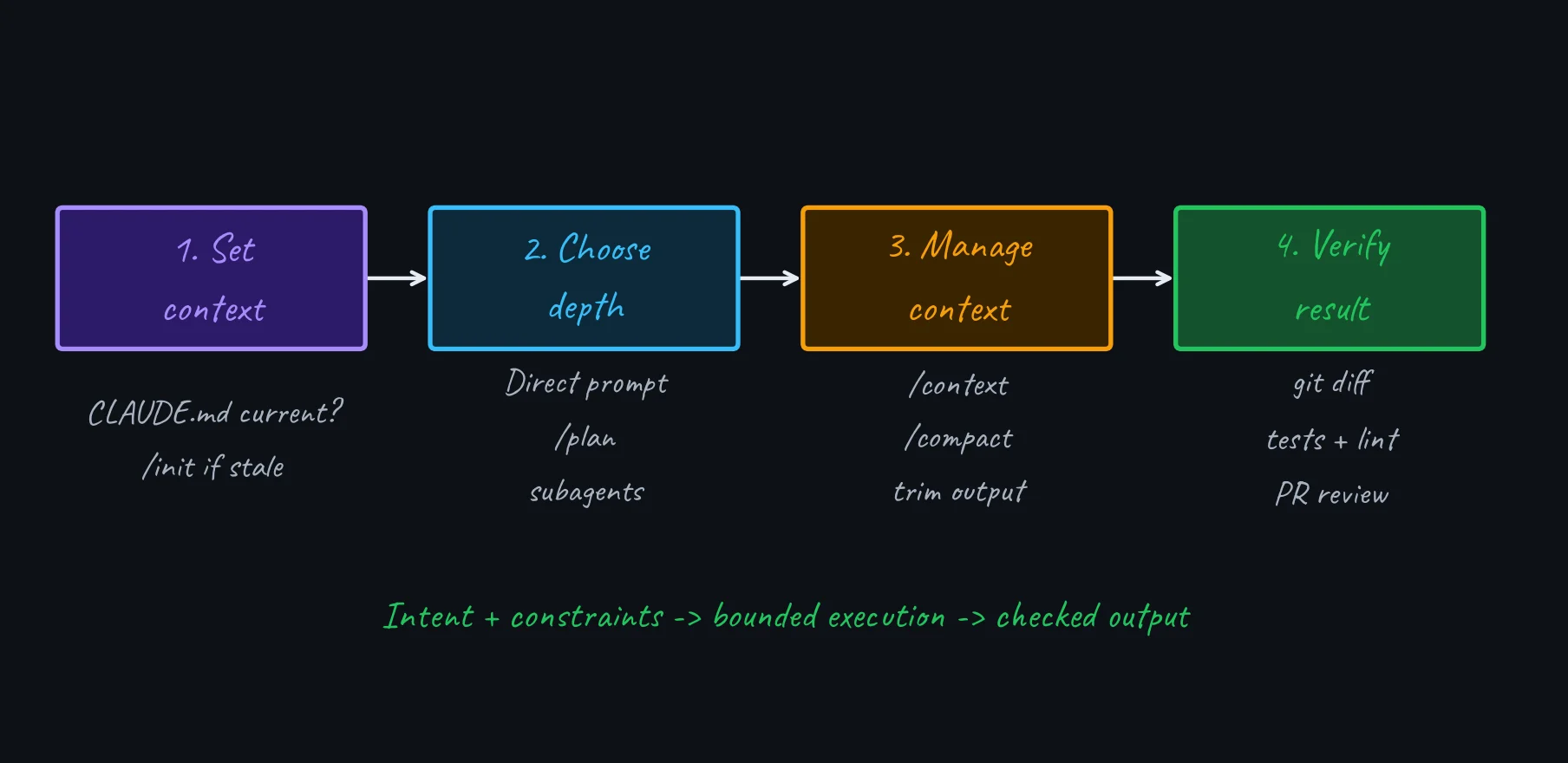
CLAUDE.md for durable instructions · /plan for complex tasks · Worktrees for isolation · Subagents for focused side work · Skills for repeatable actions · /compact when context fills · Intent + acceptance criteria · Diff + tests before acceptance
Resources
- Claude Code official documentation — tools, skills, workflows, subagents, planning mode
- Claude Code best practices — prompting patterns, guardrails, context management
- Anthropic’s guide to agentic coding — ReAct loop, quality scaffolding, CLI vs MCP tradeoffs
Thank You
Other slide decks on software engineering practices
$ claude --help
Claude Code — AI pair programmer
Use it well. Ship great software.