Introduction to Snapshot Testing in R
Indrajeet Patil

Source code for these slides can be found on GitHub.
Unit testing
The goal of a unit test is to capture the expected output of a function using code and making sure that actual output after any changes matches the expected output.
{testthat} is a popular framework for writing unit tests in R.
Benefits of unit testing
- insures against unintentionally changing function behaviour
- prevents re-introducing already fixed bugs
- acts as the most basic form of developer-focused documentation
- catches breaking changes coming from upstream dependencies
- etc.
Test output
Test pass only when actual function behaviour matches expected.
| actual | expected | tests |
|---|---|---|
Unit testing with {testthat}: A recap
Test organization
Testing infrastructure for R package has the following hierarchy:
| Component | Role |
|---|---|
|
Test file |
Tests for R/foo.R will typically be in tests/testthat/test-foo.R. |
| Tests | A single file can contain multiple tests. |
| Expectations | A single test can have multiple expectations. |
Example test file
Every test is a call to
testthat::test_that()function.Every expectation is represented by
testthat::expect_*()function.You can generate a test file using
usethis::use_test()function.
# File: tests/testthat/test-op.R

# test-1
test_that("multiplication works", {
  expect_equal(2 * 2, 4) # expectation-1
  expect_equal(-2 * 2, -4) # expectation-2
})

# test-2
test_that("addition works", {
  expect_equal(2 + 2, 4) # expectation-1
  expect_equal(-2 + 2, 0) # expectation-2
})

...
What is different about snapshot testing?
A unit test records the code to describe expected output.
(actual) (expected)
A snapshot test records expected output in a separate, human-readable file.
(actual) (expected)
Why do you need snapshot testing?
If you develop R packages and have struggled to
- test that text output prints as expected
- test that an entire file is as expected
- test that generated graphical output looks as expected
- update such tests en masse
then you should be excited to know more about snapshot tests (aka golden tests)! 🤩
Prerequisites
Familiarity with writing unit tests using {testthat}.
If not, have a look at this chapter from R Packages book.
Package versions assumed
Examples in these slides assume testthat ≥ 3.3.2, vdiffr ≥ 1.0.8, and shinytest2 ≥ 0.5.1.
Testing text outputs
Snapshot tests can be used to test that text output prints as expected.
Important for testing functions that pretty-print R objects to the console, create elegant and informative exceptions, etc.
Example function
Let’s say you want to write a unit test for the following function:
Source code
Note that you want to test that the printed output looks as expected.
Therefore, you need to check for all the little bells and whistles in the printed output.
Example test
Even testing this simple function is a bit painful because you need to keep track of every escape character, every space, etc.
Test passed with 1 success 🎉.With a more complex code, it’d be impossible for a human to reason about what the output is supposed to look like.
Important
If this is a utility function used by many other functions, changing its behaviour would entail manually changing expected outputs for many tests.
This is not maintainable! 😩
Alternative: Snapshot test
Instead, you can use expect_snapshot(), which, when run for the first time, generates a Markdown file with expected/reference output.
Test passed with 1 success 🥇.Warning
The first time a snapshot is created, it becomes the truth against which future function behaviour will be compared.
Thus, it is crucial that you carefully check that the output is indeed as expected. 🔎
Human-readable Markdown file
Compared to your unit test code representing the expected output
"Movie: \n Title: Salaam Bombay!\n Director: Mira Nair"notice how much more human-friendly the Markdown output is!
It is easy to see what the printed text output is supposed to look like. In other words, snapshot tests are useful when the intent of the code can only be verified by a human.
More about snapshot Markdown files
If test file is called
test-foo.R, the snapshot will be saved totests/testthat/_snaps/foo.md.If there are multiple snapshot tests in a single file, corresponding snapshots will also share the same
.mdfile.By default,
expect_snapshot()will capture the code, the object values, and any side-effects.
What test success looks like
If you run the test again, it’ll succeed:
Test passed with 1 success 🎉.Why does my test fail on a re-run?
If testing a snapshot you just generated fails on re-running the test, this is most likely because your test is not deterministic. For example, if your function deals with random number generation.
In such cases, setting a seed (e.g. set.seed(42)) should help. For volatile text such as temporary paths or timestamps, use the native transform argument to normalise the output before comparison.
What test failure looks like
When function changes, snapshot doesn’t match the reference, and the test fails:
Changes to function
Failure message provides expected (-) vs observed (+) diff.
Test failure
── Failure: `print_movies()` prints as expected ────────────────────────────────
Snapshot of code has changed:
old[2:6] vs new[2:6]
    cat(print_movies(c("Title", "Director"), c("Salaam Bombay!", "Mira Nair")))
  Output
    Movie:
-     Title: Salaam Bombay!
+     Title- Salaam Bombay!
-     Director: Mira Nair
+     Director- Mira Nair
* Run `testthat::snapshot_accept("slides.qmd")` to accept the change.
* Run `testthat::snapshot_review("slides.qmd")` to review the change.
Error:
! Test failed with 1 failure and 0 successes.Fixing tests
Message accompanying failed tests make it explicit how to fix them.
- If the change was deliberate, you can accept the new snapshot as the current truth.
- If this was unexpected, you can reject the changes, discarding all
.newsnapshot files.
- If you are unsure, you can review the changes interactively and decide per snapshot.
Fixing multiple snapshot tests
If this is a utility function used by many other functions, changing its behaviour would lead to failure of many tests.
You can update all new snapshots with snapshot_accept(), or discard them all with snapshot_reject(). And, of course, check the diffs to make sure that the changes are expected.
Snapshot variants
Sometimes the expected output differs legitimately across environments — e.g. on Windows vs. macOS, or across R versions. Rather than maintaining separate test files, you can use snapshot variants.
Pass a variant string directly to expect_snapshot():
test_that("f() output on Windows", {
  expect_snapshot(f(), variant = "windows")
})
Snapshots are then saved to _snaps/windows/ instead of _snaps/, so each variant gets its own reference file.
Note
Variants are most useful when you know the output will differ and you want to track each variant explicitly. For output that should be identical everywhere, avoid variants — they multiply the maintenance burden. Delete variant directories when they are no longer used because testthat cannot infer every valid variant in advance.
Capturing messages and warnings
So far you have tested text output printed to the console, but you can also use snapshots to capture messages, warnings, and errors.
message
f <- function() message("Some info for you.")

test_that("f() messages", {
  expect_snapshot(f())
})
Test passed with 1 success 😸.warning
g <- function() warning("Managed to recover.")

test_that("g() warns", {
  expect_snapshot(g())
})
── Warning: g() warns ──────────────────────────────────────────────────────────
Adding new snapshot:
Code
g()
Condition
Warning in `g()`:
Managed to recover.
Test passed with 1 success 🎊.Tip
Snapshot records both the condition and the corresponding message.
You can now rest assured that the users are getting informed the way you want! 😌
Capturing errors
In case of an error, the function expect_snapshot() itself will produce an error.
You can capture it:
Test passed with 1 success 🎉.Further reading
testthat article on snapshot testing
Introduction to golden testing
Docs for Jest library in JavaScript, which inspired snapshot testing implementation in testthat
Testing graphical outputs
To create graphical expectations, you will use testthat extension package: {vdiffr}.
How does {vdiffr} work?
vdiffr introduces expect_doppelganger() to generate testthat expectations for graphics. It does this by writing SVG snapshot files for outputs!
The figure to test can be:
- a
ggplotobject (fromggplot2::ggplot()) - a
recordedplotobject (fromgrDevices::recordPlot()) - any object with a
print()method
Note
If test file is called
test-foo.R, the snapshot will be saved totests/testthat/_snaps/foofolder.In this folder, there will be one
.svgfile for every test intest-foo.R.The name for the
.svgfile will be sanitized version oftitleargument toexpect_doppelganger().
Example function
Let’s say you want to write a unit test for the following function:
Source code
library(ggplot2)

create_scatter <- function() {
  ggplot(mtcars, aes(wt, mpg)) +
    geom_point(size = 3, alpha = 0.75) +
    geom_smooth(method = "lm")
}
Output
create_scatter()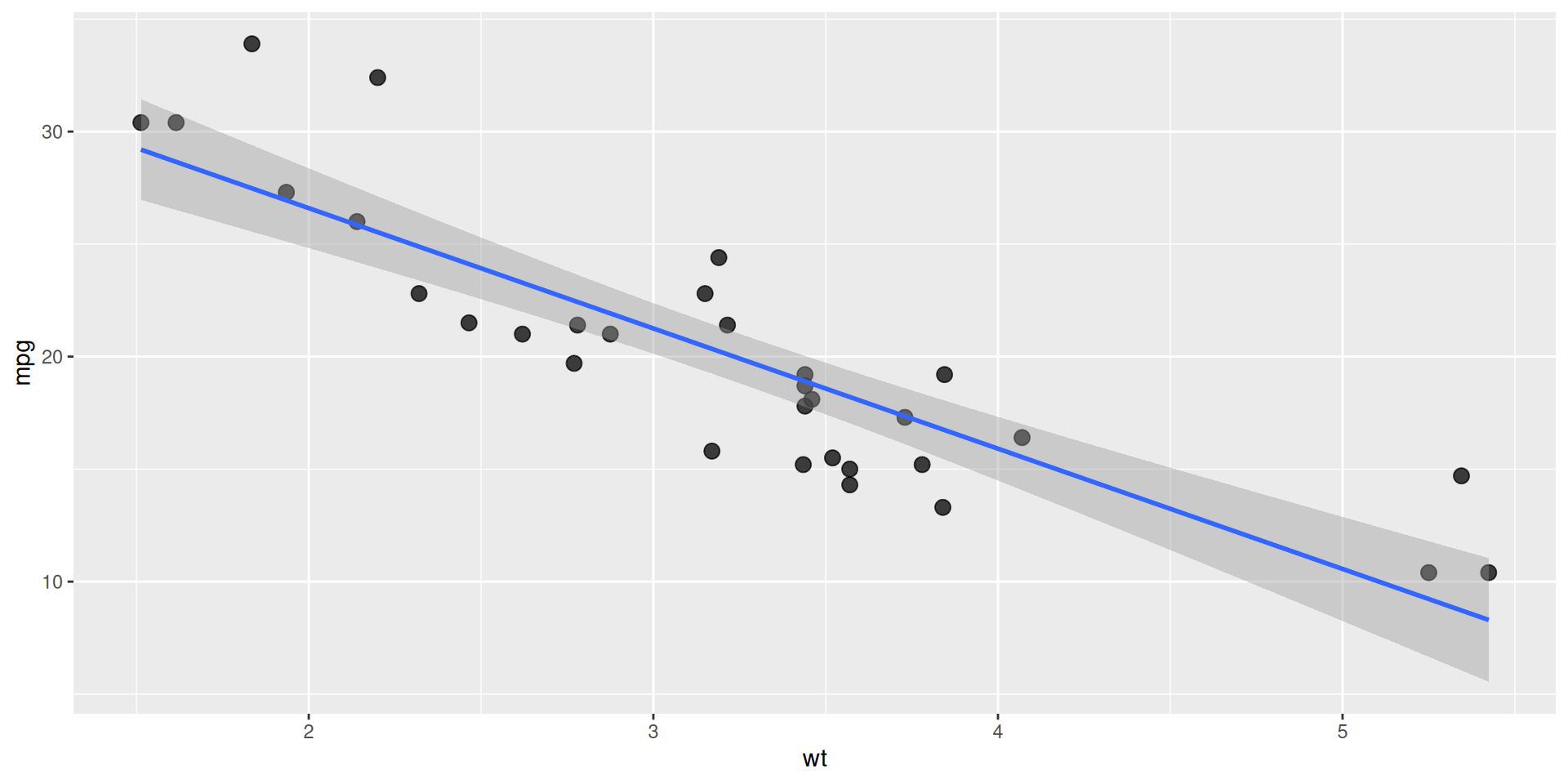
Note that you want to test that the graphical output looks as expected, and this expectation is difficult to capture with a unit test.
Graphical snapshot test
You can use expect_doppelganger() from vdiffr to test this!
The first time you run the test, it’d generate an .svg file with expected output.
test_that("`create_scatter()` plots as expected", {
  expect_doppelganger(
    title = "create scatter",
    fig = create_scatter(),
  )
})
Test passed with 1 success 🥳.Warning
The first time a snapshot is created, it becomes the truth against which future function behaviour will be compared.
Thus, it is crucial that you carefully check that the output is indeed as expected. 🔎
You can open .svg snapshot files in a web browser for closer inspection.
What test success looks like
If you run the test again, it’ll succeed:
test_that("`create_scatter()` plots as expected", {
  expect_doppelganger(
    title = "create scatter",
    fig = create_scatter(),
  )
})
Test passed with 1 success 🌈.What test failure looks like
When function changes, snapshot doesn’t match the reference, and the test fails:
Changes to function
Test failure
test_that("`create_scatter()` plots as expected", {
  expect_doppelganger(
    title = "create scatter",
    fig = create_scatter(),
  )
})

── Failure ('<text>:3'): `create_scatter()` plots as expected ──────────────────
Snapshot of `testcase` to 'slides.qmd/create-scatter.svg' has changed
Run `testthat::snapshot_review('slides.qmd/')` to review changes
Backtrace:
 1. vdiffr::expect_doppelganger(...)
 3. testthat::expect_snapshot_file(...)
Error in `reporter$stop_if_needed()`:
! Test failed
Fixing tests
For text file types such as .json, .txt, and .md, testthat now includes a line diff directly in the failure message.
Running snapshot_review() launches a Shiny app when you want to inspect and accept or reject changes interactively, or review binary snapshots.
Graphical snapshot failures and variants
Why are my snapshots for plots failing?! 😔
If tests fail even if the function didn’t change, it can be due to any of the following reasons:
- R’s graphics engine changed
- ggplot2 itself changed
- non-deterministic behaviour
- changes in system libraries
For these reasons, snapshot tests for plots tend to be fragile and are not run on CRAN machines by default.
Graphical snapshot variants
Just like text snapshots, expect_doppelganger() supports a variant argument for cases where the expected plot legitimately differs across environments:
expect_doppelganger("my plot", fig = my_plot(), variant = "windows")Further reading
Testing entire files
Whole file snapshot testing makes sure that media, data frames, text files, etc. are as expected.
Writing test
Let’s say you want to test JSON files generated by jsonlite::write_json().
Test
# File: tests/testthat/test-write-json.R
test_that("json writer works", {
  r_to_json <- function(x) {
    path <- tempfile(fileext = ".json")
    jsonlite::write_json(x, path)
    path
  }

  x <- list(1, list("x" = "a"))
  expect_snapshot_file(r_to_json(x), "demo.json")
})
Test passed with 1 success 🌈.Snapshot
Note
To snapshot a file, you need to write a helper function that provides its path.
If a test file is called
test-foo.R, the snapshot will be saved totests/testthat/_snaps/foofolder.In this folder, there will be one file (e.g.
.json) for everyexpect_snapshot_file()expectation intest-foo.R.The name for snapshot file is taken from
nameargument toexpect_snapshot_file().
What test success looks like
If you run the test again, it’ll succeed:
# File: tests/testthat/test-write-json.R
test_that("json writer works", {
  r_to_json <- function(x) {
    path <- tempfile(fileext = ".json")
    jsonlite::write_json(x, path)
    path
  }

  x <- list(1, list("x" = "a"))
  expect_snapshot_file(r_to_json(x), "demo.json")
})
Test passed with 1 success 🥳.What test failure looks like
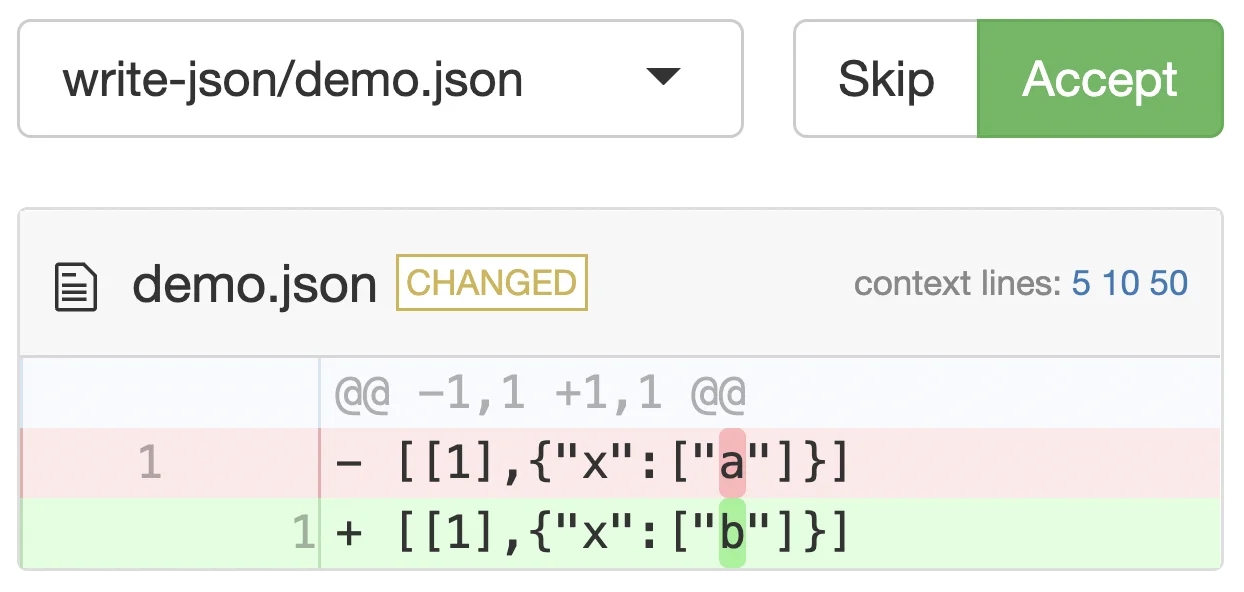
If the new output doesn’t match the expected one, the test will fail:
── Failure: json writer works ──────────────────────────────────────────────────
Snapshot of `r_to_json(x)` has changed.
Differences:
    old               | new
[1] [[1],{"x":["a"]}] - [[1],{"x":["b"]}] [1]
* Run `testthat::snapshot_accept("slides.qmd/")` to accept the change.
* Run `testthat::snapshot_review("slides.qmd/")` to review the change.
Error:
! Test failed with 1 failure and 0 successes.Fixing tests
Running snapshot_review() launches a Shiny app which can be used to either accept or reject the new output(s).
Further reading
Documentation for expect_snapshot_file()
Testing Shiny applications
To write formal tests for Shiny applications, you will use testthat extension package: {shinytest2}.
How does {shinytest2} work?
shinytest2 uses a Shiny app (how meta! 😅) to record user interactions with the app and generate snapshots of the application’s state. Future behaviour of the app will be compared against these snapshots to check for any changes.
Exactly how tests for Shiny apps in R package are written depends on how the app is stored. There are two possibilities, and you will discuss them both separately.
Stored in /inst folder
├── DESCRIPTION
├── R
├── inst
│   └── sample_app
│       └── app.R
Returned by a function
├── DESCRIPTION
├── R
│   └── app-function.R
Shiny app in subdirectory
├── DESCRIPTION
├── R
├── inst
│   └── sample_app
│       └── app.R
Example app
Let’s say this app resides in the inst/unitConverter/app.R file.
App
Code
library(shiny)

ui <- fluidPage(
  titlePanel("Convert kilograms to grams"),
  numericInput("kg", "Weight (in kg)", value = 0),
  textOutput("g")
)

server <- function(input, output, session) {
  output$g <- renderText(
    paste0("Weight (in g): ", input$kg * 1000)
  )
}

shinyApp(ui, server)
Generating a test
To create a snapshot test, go to the app directory and run record_test().
Auto-generated artefacts
Test
library(shinytest2)

test_that("{shinytest2} recording: unitConverter", {
  app <- AppDriver$new(
  name = "unitConverter", height = 543, width = 426)
  app$set_inputs(kg = 1)
  app$set_inputs(kg = 10)
  app$expect_values()
})
Snapshot
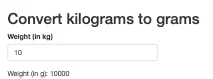
Note
record_test()saves the test file directly to the package’stests/testthat/directory (e.g.tests/testthat/test-shinytest2.R). No separate driver script is needed.The snapshots are saved in
tests/testthat/_snaps/{test-name}/. The{.variant}subdirectory (e.g._snaps/windows-4.1/) is used when tests produce OS- or R-version-specific output.
What test failure looks like
Let’s say, while updating the app, you make a mistake, which leads to a failed test.
Changed code with mistake
Test failure JSON diff
Updating snapshots
Fixing this test will be similar to fixing any other snapshot test you’ve seen thus far.
shinytest2 provides a Shiny app for comparing the old and new snapshots.
Function returns Shiny app
├── DESCRIPTION
├── R
│   └── app-function.R
Example app and test
shinytest2 can run the package function directly in its background R process. You don’t need to create and serialise the Shiny app object first.
Source code
# File: R/unit-converter.R
unitConverter <- function() {
  ui <- fluidPage(
    titlePanel("Convert kilograms to grams"),
    numericInput("kg", "Weight (in kg)", value = 0),
    textOutput("g")
  )

  server <- function(input, output, session) {
    output$g <- renderText(
      paste0("Weight (in g): ", input$kg * 1000)
    )
  }

  shinyApp(ui, server)
}Recording function-based apps
Pass the function itself to record_test():
record_test(unitConverter, name = "unit-converter")The recorder can capture the interactions, but it cannot save a function-based test automatically. Copy the generated commands into the test file, then run devtools::test_active_file() to generate snapshots.
Note
Native function support removes the need to construct and serialise the app object. The copy-paste step remains because the recorder cannot write a reusable function reference into the generated test.
One package-level test layout
Package authors should keep every Shiny test in the package’s existing tests/testthat/ infrastructure, whether an app is stored under inst/ or returned by a function.
├── inst
│   └── sample_app
│       └── app.R
├── R
│   └── unit-converter.R
└── tests
    ├── testthat
    │   ├── _snaps
    │   │   ├── app-sample_app
    │   │   │   └── sample_app-001.json
    │   │   └── unit-converter
    │   │       └── unit-converter-001.json
    │   ├── test-app-sample_app.R
    │   └── test-unit-converter.R
    └── testthat.R
There is no nested inst/.../tests/ tree and no package-level driver test. For multiple apps, use one ordinary test file per app.
Advanced topics
The following are some advanced topics that are beyond the scope of the current presentation, but you may wish to know more about.
Extra
If you want to test Shiny apps with continuous integration using shinytest2, read this article.
shinytest2 is a successor to shinytest package. If you want to migrate from the latter to the former, have a look at this.
Further reading
Testing chapter from Mastering Shiny book
shinytest2 article introducing its workflow
shinytest2 article on how to test apps in R packages
Headaches
It’s not all kittens and roses when it comes to snapshot testing.
Let’s see some issues you might run into while using them. 🤕
Testing behaviour that you don’t own
Let’s say you write a graphical snapshot test for a function that produces a ggplot object. If ggplot2 authors make some modifications to this object, your tests will fail, even though your function works as expected!
In other words, your tests are now at the mercy of other package authors because snapshots are capturing things beyond your package’s control.
Caution
Tests that fail for reasons other than what they are testing for are problematic. Thus, be careful about what you snapshot and keep in mind the maintenance burden that comes with dependencies with volatile APIs.
Note
A way to reduce the burden of keeping snapshots up-to-date is to automate this process. But there is no free lunch in this universe, and now you need to maintain this automation! 🤷
Failures in non-interactive environments
If snapshots fail locally, you can just run snapshot_review(), but what if they fail in non-interactive environments (on CI/CD platforms, during R CMD Check, etc.)?
The easiest solution is to download the new snapshots to your local folder and run snapshot_review().
Tip
If expected snapshot is called (e.g.) foo.svg, there will be a new snapshot file foo.new.svg in the same folder when the test fails.
snapshot_review() compares these files to reveal how the outputs have changed.
New snapshots must be created locally first
expect_snapshot() intentionally fails on CI when it encounters a new snapshot that has never been committed — this signals that you forgot to run the tests locally before pushing.
Always run your tests locally first and commit the generated snapshot files before opening a pull request.
But where can you find the new snapshots?
Accessing new snapshots
In local R CMD Check, you can find new snapshots in .Rcheck folder:
On GitHub Actions, upload snapshots as artefacts so you can retrieve them:
Then download them directly into your local package with snapshot_download_gh():
testthat::snapshot_download_gh()This replaces the manual step of downloading the artefact zip and copying files by hand.
Code review with snapshot tests
Despite snapshot tests making the expected outputs more human-readable, given a big enough change and complex enough output, sometimes it can be challenging to review changes to snapshots.
How do you review pull requests with complex snapshots changes?
Reviewing snapshot changes
Danger of silent failures
Given their fragile nature, most snapshot comparisons are not enforced on CRAN by default. testthat returns without comparing, vdiffr does not fail on a mismatch, and shinytest2 skips when an AppDriver is initialised.
Although this makes sense, it means that you miss out on anything but a breaking change from upstream dependency. E.g., if ggplot2 (hypothetically) changes how the points look, you won’t know about this change until you happen to run your snapshot tests again locally or on CI/CD.
Ordinary deterministic unit expectations run on CRAN, on the other hand, and will report failures.
Tip
A way to insure against such silent failures is to run tests regularly on CI/CD platforms (e.g. nightly or weekly builds).
Parting wisdom
What not to do
Don’t use snapshot tests for everything
It is tempting to use them everywhere out of laziness. But they are sometimes inappropriate (e.g. when testing requires external benchmarking).
Let’s say you write a function to extract estimates from a regression model.
extract_est <- function(m) m$coefficientsIts test should compare results against an external benchmark, and not a snapshot.
Good
test_that("`extract_est()` works", {
  m <- lm(wt ~ mpg, mtcars)
  expect_equal(
    extract_est(m)[[1]],
    m$coefficients[[1]]
  )
})
Bad
test_that("`extract_est()` works", {
  m <- lm(wt ~ mpg, mtcars)
  expect_snapshot(extract_est(m))
})
Snapshot for humans, not machines
Snapshot testing is appropriate when the human needs to be in the loop to make sure that things are working as expected. Therefore, the snapshots should be human readable.
E.g. if you write a function that plots something:
point_plotter <- function() ggplot(mtcars, aes(wt, mpg)) + geom_point()To test it, you should snapshot the plot, and not the underlying data, which is hard to make sense of for a human.
Good
test_that("`point_plotter()` works", {
  expect_doppelganger(
    "point-plotter-mtcars",
    point_plotter()
  )
})
Bad
test_that("`point_plotter()` works", {
  p <- point_plotter()
  pb <- ggplot_build(p)
  expect_snapshot(pb$data)
})
Don’t blindly accept snapshot changes
Resist formation of such a habit.
testthat provides tools to make it very easy to review changes, so no excuses!
Self-study
In this presentation, you deliberately kept the examples and the tests simple.
To see a more realistic usage of snapshot tests, you can study open-source test suites.
Suggested repositories
Print outputs
Visualizations
Shiny apps
Thank You
And Happy Snapshotting! 😊
Check out my other slide decks on software development best practices
Session information
sessioninfo::session_info(include_base = TRUE)─ Session info ───────────────────────────────────────────────────────────────
setting value
version R version 4.6.1 (2026-06-24)
os Ubuntu 24.04.5 LTS
system x86_64, linux-gnu
ui X11
language (EN)
collate C.UTF-8
ctype C.UTF-8
tz UTC
date 2026-10-07
pandoc 3.12 @ /opt/hostedtoolcache/pandoc/3.12/x64/ (via rmarkdown)
quarto 1.10.19 @ /usr/local/bin/quarto
─ Packages ───────────────────────────────────────────────────────────────────
package * version date (UTC) lib source
base * 4.6.1 2026-06-24 [3] local
brio 1.1.5 2024-04-24 [1] RSPM
cli 3.6.6 2026-04-09 [1] RSPM
compiler 4.6.1 2026-06-24 [3] local
crayon 1.5.3 2024-06-20 [1] RSPM
datasets * 4.6.1 2026-06-24 [3] local
desc 1.4.3 2023-12-10 [1] RSPM
diffobj 0.3.9 2026-09-11 [1] RSPM
digest 0.6.39 2025-11-19 [1] RSPM
evaluate 1.0.5 2025-08-27 [1] RSPM
farver 2.1.2 2024-05-13 [1] RSPM
fastmap 1.2.0 2024-05-15 [1] RSPM
ggplot2 * 4.0.3 2026-04-22 [1] RSPM
glue 1.8.1 2026-04-17 [1] RSPM
graphics * 4.6.1 2026-06-24 [3] local
grDevices * 4.6.1 2026-06-24 [3] local
grid 4.6.1 2026-06-24 [3] local
gtable 0.3.6 2024-10-25 [1] RSPM
htmltools 0.5.9 2025-12-04 [1] RSPM
jsonlite 2.0.0 2025-03-27 [1] RSPM
knitr 1.52 2026-09-06 [1] RSPM
labeling 0.4.3 2023-08-29 [1] RSPM
lattice 0.22-9 2026-02-09 [3] CRAN (R 4.6.1)
lifecycle 1.0.5 2026-01-08 [1] RSPM
magrittr 2.0.5 2026-04-04 [1] RSPM
Matrix 1.7-5 2026-03-21 [3] CRAN (R 4.6.1)
methods * 4.6.1 2026-06-24 [3] local
mgcv 1.9-4 2025-11-07 [3] CRAN (R 4.6.1)
nlme 3.1-169 2026-03-27 [3] CRAN (R 4.6.1)
otel 0.2.0 2025-08-29 [1] RSPM
pkgload 1.5.3 2026-06-15 [1] RSPM
R6 2.6.1 2025-02-15 [1] RSPM
RColorBrewer 1.1-3 2022-04-03 [1] RSPM
rlang 1.3.0 2026-07-05 [1] RSPM
rmarkdown 2.32 2026-09-01 [1] RSPM
rprojroot 2.1.1 2025-08-26 [1] RSPM
S7 0.2.2 2026-04-22 [1] RSPM
scales 1.4.0 2025-04-24 [1] RSPM
sessioninfo 1.2.4 2026-06-04 [1] any (@1.2.4)
splines 4.6.1 2026-06-24 [3] local
stats * 4.6.1 2026-06-24 [3] local
testthat * 3.3.2 2026-01-11 [1] RSPM
tools 4.6.1 2026-06-24 [3] local
utils * 4.6.1 2026-06-24 [3] local
vctrs 0.7.3 2026-04-11 [1] RSPM
vdiffr * 1.0.9 2026-02-13 [1] RSPM
waldo 0.6.2 2025-07-11 [1] RSPM
withr 3.0.3 2026-06-19 [1] RSPM
xfun 0.61 2026-09-16 [1] RSPM
yaml 2.3.12 2025-12-10 [1] RSPM
[1] /home/runner/work/_temp/Library
[2] /opt/R/4.6.1/lib/R/site-library
[3] /opt/R/4.6.1/lib/R/library
* ── Packages attached to the search path.
──────────────────────────────────────────────────────────────────────────────