








Preventive Care for R Packages

Indrajeet Patil

A watering can waters a cardboard box in a plant pot, illustrating preventive package care.

Source code for these slides can be found on GitHub.

“Software engineering ought to produce sustainability.”

- Mark Seemann (Code That Fits in Your Head)

Target audience

As an R package developer, if you ever lay awake in the bed wondering:

  • if the users are having a bad experience while using the package,
  • if you will receive the dreaded CRAN email about archival, and
  • if you will be able to update the package in time,

then this presentation is for you! 😊

Before we begin

Don’t miss the forest for the trees.

Scope of this presentation

It’s not about the tools

I will rely heavily on GitHub as the hosting platform and GitHub Actions as the CI/CD framework. Even if you use neither, the broader takeaways should still be relevant. You can implement the necessary checks with preferred tech stack.


It’s not just about CRAN

Following the recommended practices will make packages more robust to CRAN checks, but that benefit is incidental. You can follow these practices even if you never plan to submit to CRAN. The goal here is to improve user experience and reduce maintenance workload.


It’s not even about R

The practices outlined here are just as relevant to software development in any other programming language (just replace the package with module/library/etc.).

Iconography


Overarching goal


Problem to solve


Bad user experience


Maintenance headaches


Tools


Automation

Digging the pit of success

How can software engineering improve sustainability

Be always release-ready

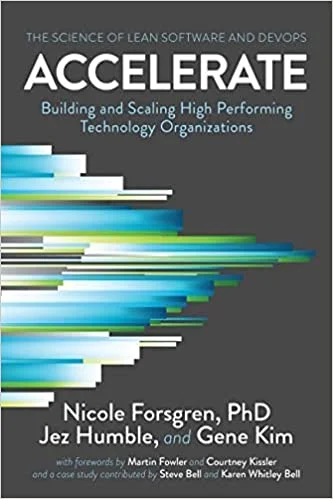
Based on research, Accelerate (Forsgren, Humble, & Kim, 2018) argues that the key difference between high-performing vs low-performing software teams is the ability to make a release at the drop of a hat.

For R packages, this translates to making sure that every commit on the main-branch is release-ready.

That is, if you were asked to make a new release soon, you can be confident that the latest commit doesn’t have any documentation issues, code quality issues, performance regressions, etc.

Cover of Accelerate: The Science of Lean Software and DevOps, by Nicole Forsgren, Jez Humble, and Gene Kim.


How can software engineering help to achieve this goal?

Fighting software entropy

The biggest reason why a software project becomes unsustainable is the unchecked accumulation of complexity.

Software engineering is the active and conscious process of preventing complexity from growing.

It provides the methodology to make sure that the software works as intended and to ensure that it stays that way.

Software development is an inherently complex process. To make it more manageable, we break it down into checklists of best practices—each designed to stave off complexity—so that we don’t forget about them.

Following each item on a checklist is a small improvement, but constantly keeping an eye on internal quality prevents software entropy from growing. Although software engineering is more than about automating this process, automation is undoubtedly an important part of it.

“The only way to go fast, is to go well.”

- Robert C. Martin

R package development

Using automation to tick checklists for various aspects of package development.

Plan

First, you will see the checklists to tick, and then the details on how to build infrastructure to ensure that none of the checklist items are forgotten.

Checklist for documentation

For a good user experience, make sure that the docs are plentiful, valid, and up-to-date.

Item
Make sure there are enough examples in the documentation.
Make sure all README examples are working.
Make sure all examples in help pages are working.
Make sure examples in vignettes are working.
Make sure all URLs are valid.
Make sure there are no spelling mistakes.
Make sure generated help-page HTML is valid.

Checklist for exception handling

To reduce maintenance headaches, make sure that warnings are easily detected for further scrutiny and forthright dealt with.


Item
Make sure examples in README produce no warnings.
Make sure examples in help pages produce no warnings.
Make sure examples in vignettes produce no warnings.
Make sure tests produce no extrinsic warnings.

Checklist for portability

For a good user experience, make sure that package would work as expected across diverse settings.


Item
Make sure package passes checks on commonly used OS.
Make sure package passes checks on all supported R versions.

The items on this list will vary significantly from package to package (e.g., does it work in different locales, with different compilers, etc.). Extend the list for your workflow!

Checklist for code quality

To reduce maintenance headaches, make sure that the code is readable, maintainable, and follows agreed conventions.


Item
Make sure the code follows a style guide.
Make sure there are no known code quality issues.
Make sure there are no performance regressions.

Checklist for dependency management

To reduce maintenance headaches, make optional features fail clearly and detect breaking dependency changes early.


Item
Guard runtime features that require a suggested dependency.
Anticipate possible breaking changes coming from dependencies and act on it.

Checklist for coding-agent readiness

To get dependable help from coding agents, make sure your conventions are written down where they can be found.


Item
Make sure shared conventions are written down for agents.
Make sure recurring procedures and requests are reusable.
Make sure your documentation is machine-readable.

Documentation

Preventive care to make sure the docs are up-to-date.

“Incorrect documentation is often worse than no documentation.”

- Bertrand Meyer

Documentation quality

For a good user experience, make sure that the docs are plentiful, valid, and up-to-date.

Make sure there are enough examples in the documentation.

An example is worth a thousand words

Access to abundant examples in help pages and vignettes provides a natural starting point for users to explore and experiment with the available functionality.

Good examples are difficult to write, but any examples are better than none.


Without enough expository examples, users are left to fumble their way into discovering the available functionality.


How to ensure that there are enough number of examples?

Sources of documentation

There are three types of documents that constitute package documentation.

README.md

Help pages

Vignettes


Therefore, we want to make sure that, when combined across these sources, there are enough examples to cover a significant proportion of available functionality.

Maintaining example code coverage

Use {covr} to compute example code coverage (i.e. proportion of the source code that is executed when running examples in help pages and vignettes), and to ensure that it is above a certain threshold.

package_coverage(type = c("examples", "vignettes"), commentDonttest = FALSE, commentDontrun = FALSE)

Use a GHA workflow to automate checking that the code coverage via examples never drops below the chosen threshold.

Additional tips

  • The choice of threshold is subjective and context-sensitive. Chasing after 100% example code coverage is futile (since this would require exposing every exception in the examples).

  • The examples not run or tested on CRAN can still be counted for computing code coverage.

  • Vignettes not included in the package (the ones in vignettes/ subdirectory or .Rbuildignore) will not contribute towards the code coverage. Ditto for README. You can adjust the threshold accordingly.

  • You could also choose the threshold on a file basis (covr::file_coverage()).

Make sure all README examples are working.

README documentation

README.md provides a quick overview of the package API and can feature examples of key functions.

Although breaking changes might be infrequent, when they do occur, the code in README may become defunct.


README.md is probably the first and the most-visited document in a project and any broken examples therein are bound to confuse many users.


How to insure against broken code in README?

Detecting broken README examples

Use devtools::build_readme() to render README.qmd or README.Rmd in a clean R session against a temporary installation of the package. Broken code will make the render fail.

devtools::build_readme()


Use a GHA workflow to automate checking that README can be successfully rendered on each commit.

Additional tips

Make sure all examples in help pages are working.

Broken examples in help pages


Types of examples

Help pages for exported functions should contain examples illustrating their usage. But you can skip executing some examples (e.g. because they are too time-consuming) using any of the following tags:

Tag example() R CMD check R CMD check --as-cran
\dontrun{}
\donttest{}
\dontshow{}

Thus, broken \dontrun{} examples are never flagged by R CMD check. Users will still see these examples and wonder why they aren’t working.

Since R 4.0.0, R CMD check --as-cran runs \donttest{} examples automatically.

How to catch examples that don’t run successfully?

Checking all examples

Use {devtools} to run all examples, and catch and fix the broken ones.

devtools::run_examples(run_dontrun = TRUE, run_donttest = TRUE)

Use a GHA workflow to make sure all examples in help pages are working on each commit.

Additional tips

  • Examples that are meant to fail should use any of the following patterns:

    • if (FALSE) { ... } (if example is included only for illustrative purposes)
    • try({ ... }) (if the intent is to display the error message)

Make sure examples in all vignettes are working.

Vignette examples


Vignettes and pkgdown articles

Use a vignette for long-form documentation that ships with the package and is checked by R CMD check. Use an article for pkgdown-only documentation that is not shipped.

R CMD check does not run code in pkgdown-only articles.


Broken examples in pkgdown-only articles still harm users. Keeping them executable also prevents surprises if an article later becomes a shipped vignette.

How do you check pkgdown-only articles?

Building all articles

Although pkgdown-only articles may not be checked by R CMD check, they are still built by {pkgdown} to generate a static website. Thus, building a website would detect broken examples in those articles.

pkgdown::build_site()


Use a GHA workflow to make sure examples in all pkgdown articles are working on each commit.

Additional tips

  • Code chunks that are meant to fail should use error=TRUE option.

Make sure all URLs are valid.

Make sure there are no spelling mistakes.

Spelling mistakes

Spelling mistakes are inevitable and, if left unchecked, they can accumulate rapidly with the increase in the documentation.


Spelling mistakes obvious to native speakers may not be so for non-native speakers, who will be frustrated that they can’t find the meaning of the misspelt word.

Additionally, misspelling technical words (e.g. innode vs. inode) can lead users down the wrong path and waste their time.


How to prevent spelling mistakes from accumulating in the documentation?

Creating a list of allowed misspellings

There exist multiple English spelling standards (e.g. in British English: anaemia, but in American English: anemia). You can specify your preferred standard in DESCRIPTION.

E.g. for British English

Language: en-GB


Additionally, some technical words will not be recognized by dictionaries, but you don’t want these to be considered spelling mistakes either. You can create a list of allowed misspelt words in the WORDLIST file.

File location

├── DESCRIPTION
├── inst
│   └── WORDLIST

Example file

addin
api
AppVeyor
biocthis
bootswatch
...
winbuilder
YAML

Updating the word list

Run spelling::update_wordlist() after reviewing spelling results. It adds accepted technical terms to inst/WORDLIST and removes entries that are no longer needed.

Detecting spelling mistakes

Use {spelling} to detect misspelt words and their location in the docs.

spelling::spell_check_package()

Use GHA workflow to ensure that spelling mistakes are caught on each commit.

Additional tips

  • Instead of a GHA workflow, you can also include spell check tests in the package itself. For more, see usethis::use_spell_check().

  • R CMD check --as-cran validates generated HTML5 help pages when a recent HTML Tidy is available. The r-lib workflow installs that prerequisite explicitly.

Exception handling

Preventive care to make sure that you don’t miss out on important warnings.

“There is a problem with warnings. No one reads them.”

- Patrick Burns

Detecting warnings

To reduce maintenance headaches, make sure that warnings are easily detected for further scrutiny and forthright dealt with.

Sending signals


Types of conditions/exceptions

A function can use conditions to signal that something unexpected has happened with varying severity.

Condition Severity Meaning
error high execution stopped because there was no way to continue
warning medium execution encountered some problem but recovered
message low execution was successful and here are some extra details

Out of these, warnings are the most nebulous!

  • Errors bring functions to a halt and you must attend to them.
  • Messages are non-fatal diagnostics; they usually need no action, but can still carry useful information.
  • But warnings are harbingers of problems that you will need to fix at some point. They need to be dealt with, pronto, and yet it is easy to ignore them.

A needle in the haystack

Types of warnings

There are two kinds of warnings that you, as a developer, will need to deal with:

Intrinsic warnings are warnings produced by functions in your package.

E.g. a warning from a function to winsorize data.

winsorize(x, threshold = 2)
#> Warning message:
#> `threshold` for winsorization must be a scalar between 0 and 0.5.

Extrinsic warnings are warnings stemming from your package dependencies.

E.g. a possible warning if your package relies on {ggside}.

ggplot(mpg, aes(hwy, class)) + geom_xsidedensity()
#> Warning: Using the `size` aesthetic in this geom was deprecated in ggplot2 3.4.0.
#> ℹ Please use `linewidth` in the `default_aes` field and elsewhere instead.


With a significant amount of package functionality and dependencies, there can be plenty of warnings at any given moment.

To avoid missing out on important warnings, there should ideally be zero of either type of warnings in your package documentation and tests. This makes it easy to notice and deal with new, potentially critical warnings as they appear.

Suppressing intrinsic warnings

There is almost never a need to explicitly highlight warnings intrinsic to your package.

  • Warnings are generated in contexts where functions in your package were used unexpectedly by the users. But such contexts shouldn’t be deliberately highlighted in the documentation. Users should always see happy path examples in help pages, README, or vignettes.

  • While testing functions, you should use expectations (e.g. testthat::expect_warning()) to check that expected warnings are triggered. You shouldn’t print the warnings, since they can completely overwhelm the test log and make it difficult to catch important warnings.

Suppressing extrinsic warnings

Warnings from dependencies can be critical and should be dealt with ASAP.

  • If dependencies are emitting warnings because your functions are using imported code in unexpected ways, rewrite functions to remove warnings.

  • If the warnings are about deprecated functions or arguments, switch to using the suggested alternatives. Don’t wait until they are removed.

  • Suppress a warning only after you understand it and cannot avoid it. When the dependency signals a classed warning, base R can suppress only that class: suppressWarnings(expr, classes = "known_warning_class").

  • Report upstream warnings to the maintainer and remove temporary suppression once the issue is fixed. Avoid blanket suppression in user-facing examples.

Detecting warnings

Make unexpected warnings fail the relevant check. Use warn = 2L for executable documentation and testthat’s native stop_on_warning argument for tests.

options(warn = 2L)
testthat::test_local(stop_on_warning = TRUE)

Use GHA workflows to automate warning checks in help pages, README, vignettes, and tests on each commit.

Additional tips

  • If a function is designed to show warnings, then you can prevent workflows from failing by conditionally running it.
#' @examplesIf getOption("warn") < 2L
#' function_showing_warning()
```{r eval = getOption("warn") < 2L}
function_showing_warning()
```
  • While you are at, it might also be worth cleaning up intrinsic and extrinsic messages. They might be harmless, but they do clog up logs and make it difficult to focus on warnings.

  • Setting warning=FALSE in vignettes only suppresses warnings in the rendered output. When users run this code interactively, they will still see warnings. Ostrich policy never works for software development.

Portability

Preventive care to make sure that your package works across a variety of settings.

“Each new user of a new system uncovers a new class of bugs.”

- Brian Kernighan

Portability

For a good user experience, make sure that package works as expected across diverse settings.

The unbearable diversity of contexts

You (the developer) may be developing the package in a certain setting: with a certain version of R, on a particular OS, in a certain locale, etc. Even if all tests pass and all examples run successfully for you locally, you can’t assume that your users will use the package in similar settings.

If you restrict checks to your own setup, you may miss problems experienced by users elsewhere (e.g. graphics code can behave differently across operating systems, or code can fail on the oldest R version you claim to support).

The key assumption here is that your package claims to support these settings. If your package docs clearly state that the package will work only on (e.g.) Windows, you don’t need to worry about other OS.


How to make sure that your package is working as expected across various settings?

Checking across multiple settings

Use {rcmdcheck} to run R CMD check from R.

rcmdcheck::rcmdcheck()

All the options you can set to further customize this check is beyond the scope of the current presentation.

Use GHA workflow to run R CMD check for multiple R versions and platforms on each commit to probe for potential portability issues.

Additional tips

  • If needed, you can run checks on additional platforms using {rhub}.

  • Fully crossed checks (all major platforms \(\times\) all supported R versions) are rarely necessary and definitely an overkill.

  • Test the oldest R version declared in DESCRIPTION. If your checks only cover newer versions, raise the stated minimum instead of claiming support you do not verify.

Code quality

Preventive care to detect code quality issues and performance regressions.

“Don’t comment bad code—rewrite it.”

- Brian W. Kernighan

Code maintainability

To reduce maintenance headaches, make sure that the code is readable, maintainable, and follows agreed conventions.

Make sure the code follows a style guide.

Code formatting


The physical layout of the program can assist the reader in understanding the underlying logic. Additionally, understanding a large codebase is easier when all the code has consistent formatting. Style guides outline conventions to enforce a uniform formatting schema across the codebase.

Style guides can be highly opinionated and arbitrary. So, more important than which style guide you follow is the fact that you follow a style guide.

In larger projects or teams, multiple contributors may have different formatting preferences. This can lead to contributors undoing each others’ changes, leading to unnecessarily large git diffs and even unnecessary unpleasantness.


How to make sure that codebase follows a consistent style guide?

Following style guide

Use air to format R code consistently throughout the package (including source code, test files, vignettes, etc.). air is a fast, opinionated R code formatter inspired by tools like Prettier (JS) and Black (Python).

air format .

Use GHA workflow to check that code is consistently formatted on each commit.

Additional tips

  • Run usethis::use_air() to create a project-level air.toml, so collaborators and CI use the same formatting configuration.

  • Format locally with air format .; in CI, use air format . --check so the job reports drift without rewriting the branch.

Make sure there are no known code quality issues.

Code quality assessment

Code smells (aka lints) are patterns that are known to be problematic for readability, efficiency, consistency, style, etc. Catching such issues early on can help prevent bugs and other issues from creeping into code, which can save time and effort when it comes to debugging and testing.

# code with a lint
lint(text = "x = 1")
::warning file=<text>,line=1,col=3::file=<text>,line=1,col=3,[assignment_linter] Use <- for assignment, not =.
# code without a lint
lint(text = "x <- 1")

In larger projects or teams, where multiple contributors may be working on the same codebase, it can become difficult for an individual contributor to detect code quality issues that they or someone else may have introduced.

How to make sure that there are no known code quality issues present?

Detecting lints

Use {lintr} to carry out static code analysis to detect code quality issues.

lintr::lint_package()

Use GHA workflow to detect all lints on each commit.

This workflow can be overwhelming at first as it can detect thousands of lints. It includes two parallel jobs: a full-package lint (runs on every push and PR) and a lint-changed-files job (runs only on PRs).

The lint-changed-files job fails if lints are found only in files that changed in a Pull Request. This is an easier and less disheartening way to clean lints.

# `lint` job (push & PRs)
env:
  LINTR_ERROR_ON_LINT: true


# `lint-changed-files` job (PRs only)
env:
  LINTR_ERROR_ON_LINT: true

Additional tips

  • Most lints related to code formatting can be removed using air.

  • Code smells are subjective and you may disagree with some linters. Use a configuration file to customize which linters you wish to include. Additionally, you can annotate parts of code that linters should ignore (e.g. # nolint start: indentation_linter. + # nolint end).

Detecting issues with non-R code

An R package contains a number of configuration files written in languages other than R (e.g., YAML, JSON, DCF, etc.), and you may also wish to make sure that none of them are malformed.


To detect multi-language code issues, you can use prek — a fast, Rust-native drop-in replacement for pre-commit — to manage and maintain git hooks. The {precommit} R package provides R-specific hooks.

The framework offers hundreds of hooks to choose from and you can choose ones relevant to your config files (e.g. to lint and format JSON and YAML files).


Use GHA workflow to detect any problems with non-R code on each commit. You can specify the hooks relevant to you in a prek config file.

Make sure there are no performance regressions.

Don’t slow it down

If your package is mature and stable enough that you have started to invest in improving its efficiency, it is important that you have some metric by which you can benchmark if a new Pull Request improves or degrades performance in comparison with the latest commit on main.

Checking for performance regressions just before or even after the release is not ideal, since it might be difficult to revert back to the state before regression took place.


How to reliably benchmark Pull Requests for performance regressions?

Detecting performance regressions

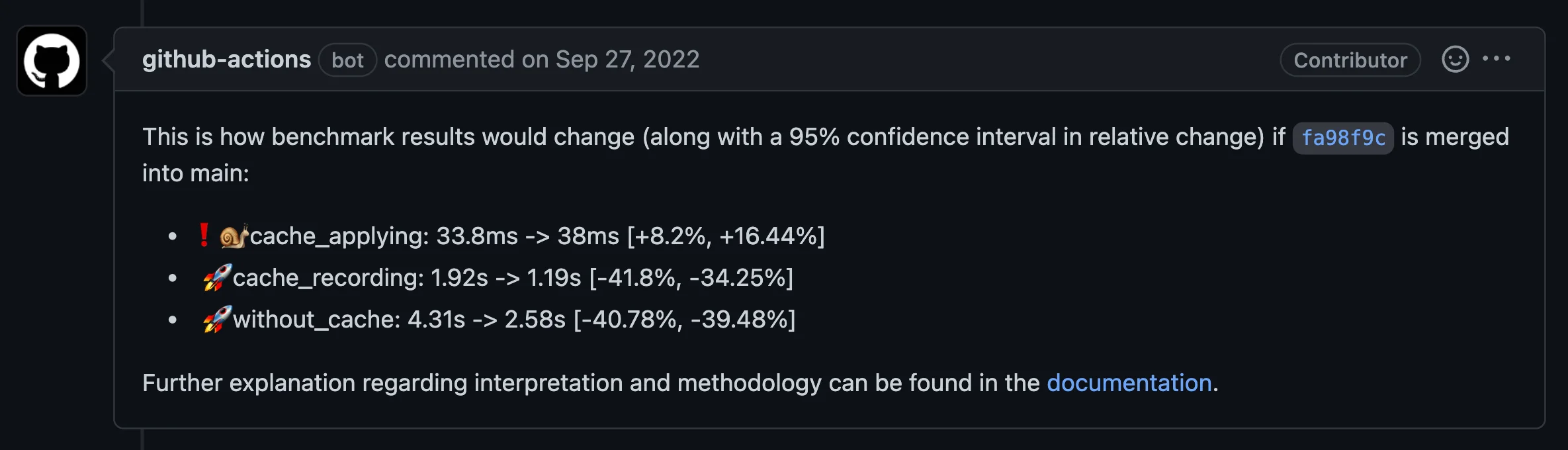
{touchstone} offers a continuous benchmarking tool for reliable relative measurement of performance in the Pull Request versus main-branch. The results are directly reported as a comment in GitHub Pull Requests.

Touchstone benchmark report: cache applying slows from 33.8 to 38 milliseconds, while cache recording improves from 1.92 to 1.19 seconds and running without cache improves from 4.31 to 2.58 seconds.

Use GHA workflow for benchmarking PRs and detecting any performance regressions.

Dependency management

Preventive care for optional features and upstream changes.

“Dependencies are invitations for other people to break your package.”

- Joshua Ulrich

Dependency management

To reduce maintenance headaches, make optional features fail clearly and detect breaking dependency changes early.

Types of Dependencies

Dependencies (code that your source code relies on) are an inevitable part of package development.

Not all dependencies are created equal!

Hard dependencies have a broader scope because they are needed at runtime; i.e. your package won’t work without them, while soft dependencies have a narrow scope; e.g. because they are needed only for testing or for examples.

Dependency In DESCRIPTION Scope
Hard Depends/Imports Needed for your package to work as expected.
Soft Suggests Optional features, examples, tests, or vignettes.

Dependencies bring risk

If a critical dependency becomes unavailable (e.g. because its author decides to archive it), bad luck. You must either refactor to remove dependency or look for an alternative. Otherwise, your package is no longer going to work. But this shouldn’t be the case for soft dependencies since they are not critical for your package to work.

Use suggested dependencies deliberately.

Soft dependency hygiene

Users do not necessarily install packages in Suggests. Any runtime feature that needs one must check for it and provide either a clear error or a fallback.

Package-development contexts are different: current R package guidance assumes Suggests are installed before running examples, vignettes, and tests. Guarding every use adds noise and can silently reduce test coverage.

Use conditional execution there only for genuine environmental constraints, such as authentication, network access, OS support, or an unusually difficult installation.


Where does a suggested dependency actually need a guard?

Conditional dependency usage

In package code: guard a feature that a user can reach without installing the suggested package.

if (!requireNamespace("lme4", quietly = TRUE)) {
  stop("Install 'lme4' to use this feature.")
}

lme4::lmer(...)

In development code: assume declared Suggests are installed unless the prerequisite is genuinely exceptional.

#' @examplesIf can_authenticate()
#' query_remote_service()

testthat::skip_if_offline()

Sources: R Packages (2e): suggested dependencies and testthat skipping guidance.

Anticipating breakages

Check dependency changes before they reach your users. Upstream maintainers may warn reverse dependencies about breaking changes, but that communication cannot be assumed.

Packages outside CRAN, and tests skipped on CRAN, may never appear in upstream reverse-dependency checks.

You may figure out that something is broken after a dependency is updated, the package stops working for the users, and they inform you. This is especially true if your package is not under active development, and so CI/CD won’t detect that your package is broken.


How to detect upcoming breaking changes in dependencies?

Detecting breakages early

In order to detect breakages earlier, you can run R CMD check by installing development versions of dependencies.

Use scheduled GHA workflow to automate checking breakages (e.g. checking against R-devel or GitHub versions of dependencies).

How frequently you should run this check (e.g., once a month, once every six months, etc.) and which dependencies you should include (e.g., only hard, only soft, a few of each, etc.) depends on how actively both your own package and your dependencies are being developed.


What should you do if you do detect a breakage?

  • If the root cause of breakage turns out to be a regression in the dependency, discuss with the maintainer.

  • If the breakage is legitimate, make a PR to your repo with a fix but merge only when either the maintainer informs you of an upcoming release or the package has a new release. Don’t push the fix to the main-branch because the breaking change could be reverted before release.

Eco-friendly workflows

Do you really need to run all workflows on each commit?!

Skipping workflows

GitHub-hosted workflows consume time and compute. Not every check needs the same trigger or cadence, especially for minor documentation-only changes.

Example of an insignificant change.

# In `NEWS.md`
- witdh
+ width

Reducing count of workflow runs

You can use a few or all of the following options to reduce the frequency with which the workflows are run.

  • Run workflows only when a PR is marked “Ready for Review”.
  • Run slower checks such as spelling and link rot on weekly or monthly schedules once their baseline is green.
  • Run some workflows only when ready for a new release.
  • Cancel workflows in progress if a new commit is made.
  • Keep required branch-protection checks running on every relevant PR update; skipped required checks can remain pending and block merging.

Caveats

No good practice is dogma. There always exist exceptions.

Using workflows flexibly

  • You can skip some workflows or create new workflows depending on the project-specific demands (e.g. compiled code, database connections, API access, etc.).

  • Sometimes it might not even be possible to run all workflows successfully because a few of them conflict with each other. Choose required checks and scheduling based on the risks of the package.

Failure is the only option

It is necessary that builds fail for any existing or newly found issues.

“Later equals never.”

- LeBlanc’s Law

Managing technical debt

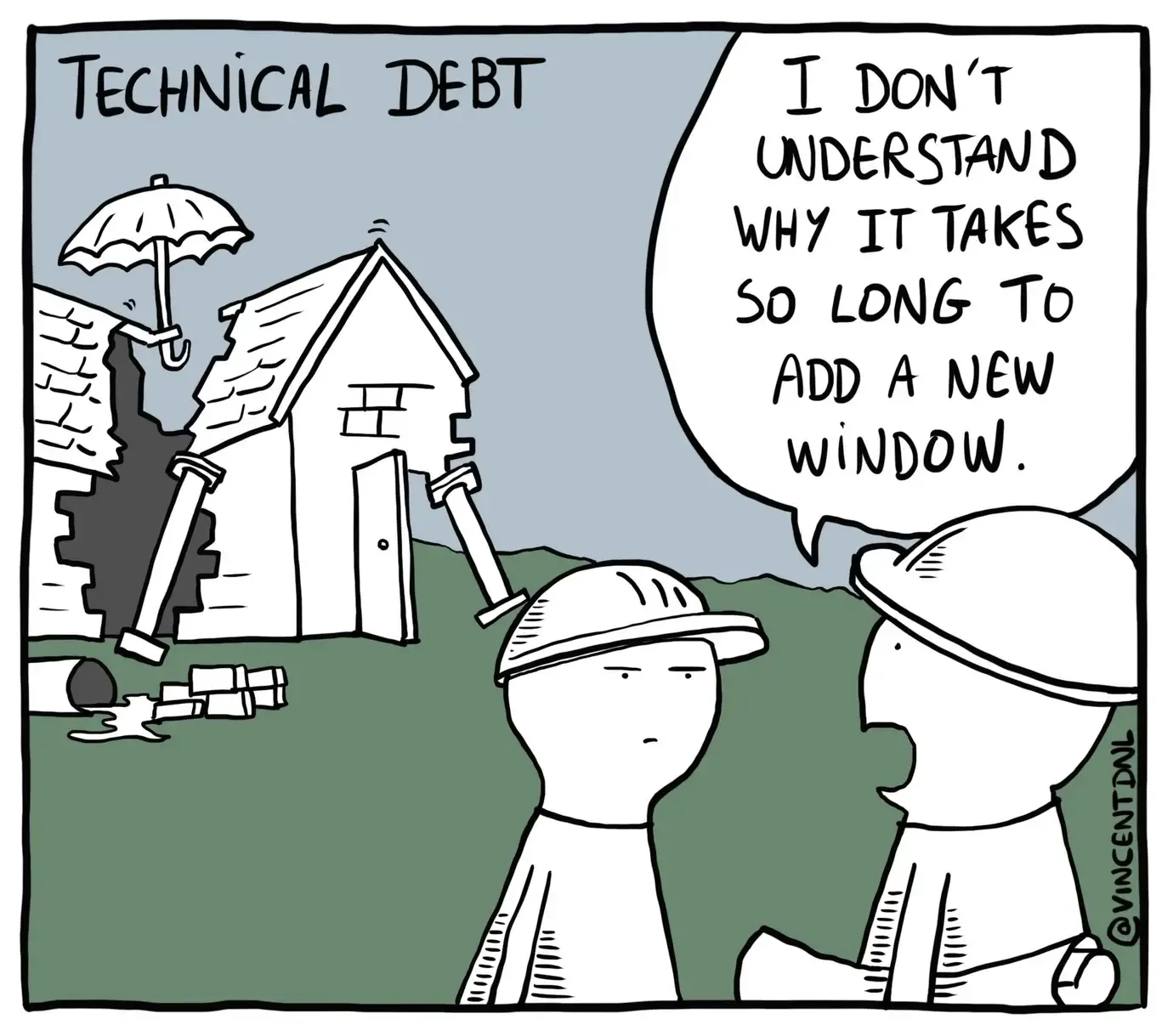
Technical debt cartoon: a collapsing house is propped up while a manager asks why adding a window takes so long.

Tomorrow never comes

It might seem excessive that workflows fail if any issue is found (“Really?! You want builds to fail even if there is a single code quality issue?!”).

But this is the only way to sidestep procrastination (“We can fix the broken link later!”) that can lead to the accumulation of technical debt. With time, this debt can compound and every new feature requires longer to implement.

Failed builds also act as organizational quality control mechanisms. You will no longer need to justify carving out time to address technical debt if a new release can’t be made unless all checks are green.

Once green, always green

The initial work you will put into achieving green checks will pay dividends in the long run. And, once a check is green, you only need to make sure that it stays that way for each new commit to the main-branch.

Easing into it

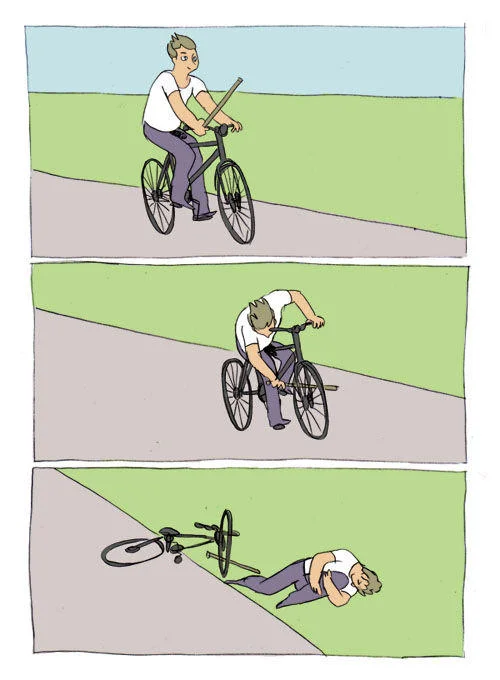
A cyclist puts a stick into the front wheel and falls off the bicycle.

It might not be feasible to implement all workflows in one go, especially when they will be marked as failed until all relevant issues have been dealt with.

This is especially true for organizations that have a policy to always keep the default branch “green”.

I’d highly recommend that you adopt such a policy, both for your organization and private repositories.

You can adopt an incremental approach of adding one workflow per PR.

This PR can be merged when the new workflow runs successfully.

Coding-agent readiness

Preventive care to make sure that coding agents can find your conventions.

“The hottest new programming language is English.”

- Andrej Karpathy

Coding-agent readiness

To get dependable help from coding agents, make sure your conventions are written down where they can be found.

Making conventions explicit

You know which files are generated, which checks to run, and which changes could break downstream packages. A coding agent needs to find this information too.

Left to guess, an agent edits generated files, skips the checks you rely on, or changes behavior that users depend on. And then it reports the task as done.

How to make sure that a coding agent follows the conventions of your package?

Where instructions live

Keep instructions and reusable tasks in the repository, alongside the code they describe. This gives agents a place to find your conventions each time they start a task.

Add or maintain What should it tell the agent?
AGENTS.md Essential conventions that apply across tasks.
.agents/skills/ Detailed procedures to load only for relevant tasks.
.github/prompts/ What you want done when you request a particular maintenance task.

Exclude all three from package tarballs via .Rbuildignore.

Where to start

Write down the instructions and commands you already give a new contributor. Add a skill or prompt when you find yourself repeating a task.

Keeping context focused

The root AGENTS.md is loaded in every session. Keep it short to leave room in the context window for code, tool output, and the task itself.

%%{init: {"theme": "base", "htmlLabels": true, "themeVariables": {"fontFamily": "Lato, sans-serif", "fontSize": "24px", "lineColor": "#9753B8"}, "flowchart": {"rankSpacing": 65, "padding": 16, "curve": "linear"}}}%%
flowchart LR
    accTitle: Load instructions as they become relevant
    accDescr: Every session loads AGENTS.md and skill names and descriptions. When a task matches a skill or the user invokes it, the agent loads that skill's SKILL.md. Supporting references are read only as needed.
    A["<span class='context-stage'>Every session</span><br/><span class='context-file'>AGENTS.md</span><br/><span class='context-detail'>+ skill names<br/>and descriptions</span>"]
    B["<span class='context-stage'>When relevant</span><br/><span class='context-file'>SKILL.md</span><br/><span class='context-detail'>Task matches<br/>or you invoke the skill</span>"]
    C["<span class='context-stage'>As needed</span><br/><span class='context-file'>References</span><br/><span class='context-detail'>Only what the<br/>procedure needs</span>"]
    A -.-> B -.-> C
    classDef stage fill:transparent,stroke:none,color:#111111
    class A,B,C stage

Not everything belongs in every session

Keep shared essentials in AGENTS.md and detailed workflows in skills. A bug-fix session need not load the full CRAN release procedure.

Make sure shared conventions are written down for agents.

Repository instructions: AGENTS.md

Put an AGENTS.md file at the repository root. It accompanies every task, so keep it short.

Include What it tells the agent
Overview What the package is for.
Commands How to test and check it.
Conventions How the code is written.
Coupled files What must change together.
Guarantees What a change must not break.

For an R package:

# Package conventions

- Keep public arguments and
  return structures stable.
- Edit roxygen in R/, then
  regenerate man/.
- Run the documented checks.
- Keep generated files in sync.

Make sure recurring procedures and requests are reusable.

Reusable procedures: .agents/skills/

A skill holds a task’s detailed procedure in its own directory. Its SKILL.md contains a name, a description of when to use it, and the instructions.

.agents/skills/
└── create-release/
    └── SKILL.md

Add scripts/, references/, or templates to use only when needed.

A skill for preparing a CRAN release:

---
name: create-release
description: Prepare or resume a CRAN
  release. Use only for release work.
---

1. Check CRAN and any open release PR.
2. Update version metadata and NEWS.
3. Run the release checks.
4. Submit from the release branch.
5. Wait for explicit CRAN acceptance
   before merging and publishing.

Describe relevant tasks or files so the coding agent can select the skill. It reads the full instructions only when the task calls for them or you invoke the skill.

Reusable requests: .github/prompts/

Keep recurring requests in plain Markdown files in the repository:

.github/prompts/
└── update-deps.md

Describe the requested change, its scope, and the expected result in the file.

A dependency-update request:

# Update package dependencies

Follow AGENTS.md. Update dependencies
and fix any resulting incompatibilities.
Preserve public behavior and run the
required checks. Open a PR describing
the changes and validation.

Running a saved request

Tag or attach @.github/prompts/update-deps.md and send it. The file already contains the request.

Make sure your documentation is machine-readable.

Machine-readable docs: llms.txt

Repository instructions tell an agent how to work on your package. Your website tells it how the package behaves.

pkgdown publishes this for you: an llms.txt index at the site root, plus a Markdown twin of every rendered page.

What lands on your website:

llms.txt              # README + indexes
index.md
reference/index.md
reference/my_function.md
articles/get-started.md

An agent fetches compact Markdown instead of scraping rendered HTML, and follows links from llms.txt to read only the pages a task needs.

Beyond your own website

Submit your repository at context7.com/add-library so agents querying Context7, through its MCP server or CLI, look up your current documentation instead of recalling an older release from training data.

Conclusion

It is possible to build robust automation infrastructure for R package development that can improve user experience and make long-term development more reliable and sustainable.

Acknowledgements

Thanks to all creators, maintainers, and contributors for the tools mentioned throughout the presentation. Without them, it wouldn’t be so easy to create robust package development architecture in R! 🙏


All images used in these slides have been taken from Flaticon (www.flaticon.com) by freepik (www.freepik.com). Huge thanks to them for making such fantastic resource freely available.

Although the current repository is published under CC0 1.0 Universal (CC0 1.0), this license does not cover images in the /media folder. If you use them, you need to follow the attribution policy stated by Flaticon.

Thank You

And Happy Package Care! 👼


Check out my other slide decks on software development best practices