llm-dependabot 
A template for your own software giga factory: schedule repository-owned prompts across your projects, and let a coding agent turn maintenance work into pull requests for you to review.
The problem
Every package, project, and application you maintain ages on its own:
-
Dependencies fall behind, and each upgrade can break something that then needs fixing by hand.
-
Vulnerabilities keep appearing, in more dependencies, more often, and each needs an upgrade before it can be closed.
-
New features go unused. Newer releases of your dependencies often make your own code simpler, but with little time to spare, those improvements are never adopted.
-
Production keeps reporting new faults. A website's Google Search Console flags new indexing, canonical, structured-data, and sitemap issues every month, and each needs someone to triage and fix it.
Bots like Dependabot bump version numbers, but they cannot fix the breakage an upgrade causes, rewrite code to use what the new version offers, or act on what production reports. The more repositories you maintain, the further this work falls behind.
The solution
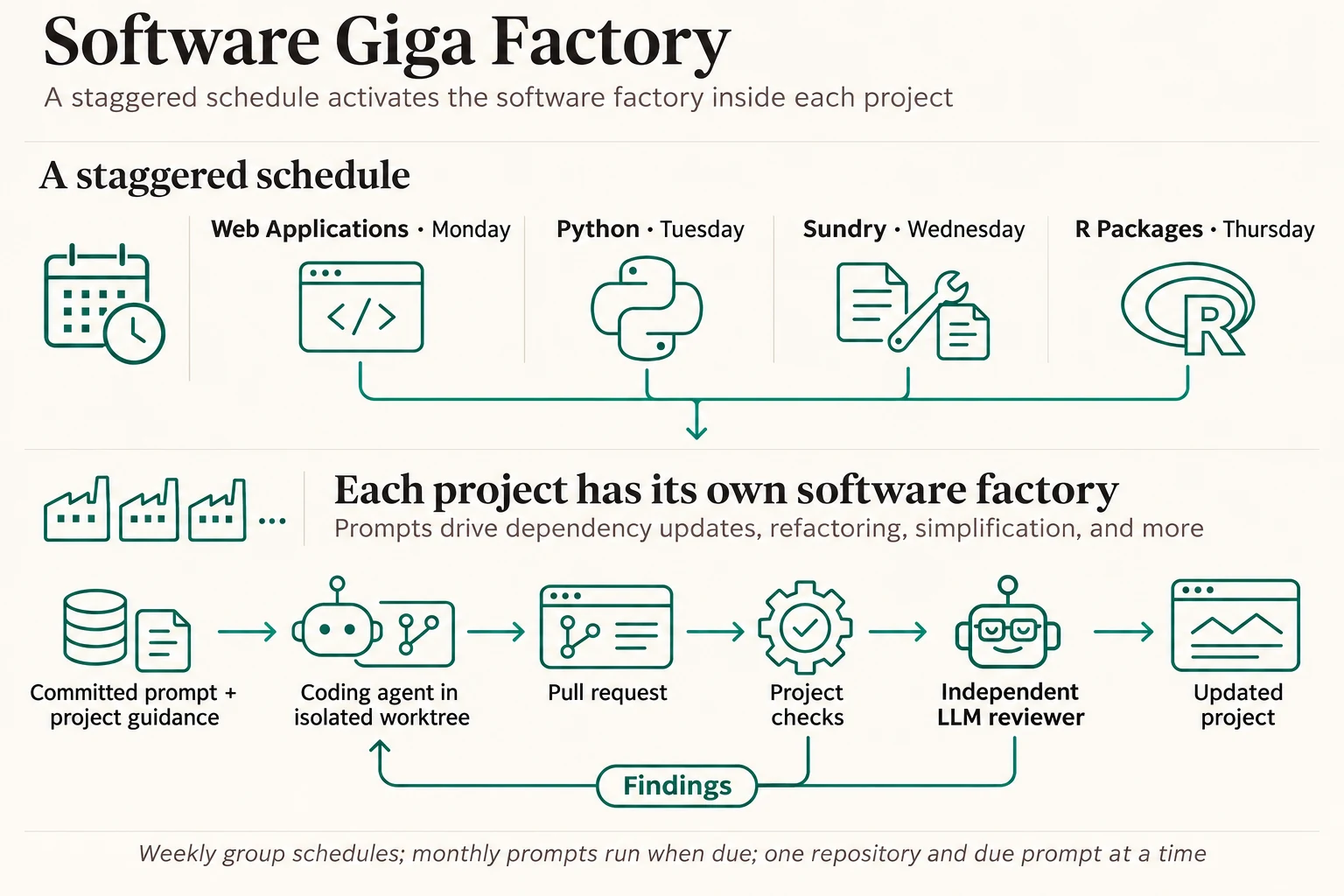
llm-dependabot coordinates a software factory in each of your projects. Each repository commits prompts describing its own maintenance (updating dependencies, simplifying the codebase, or anything else), and on a schedule, llm-dependabot runs each due prompt with the agent. The agent opens a pull request, which goes through the project's own checks and your review like any other.
The giga factory is the layer coordinating those project-level factories: it decides which repositories and prompts are due, prepares isolated worktrees, and invokes your chosen agent. Dependency updates are one use case; repository-owned prompts can also cover refactoring, documentation, fixing what Google Search Console reports, or other repeatable work. The prompts define the work, and each project provides its own instructions, checks, and review process.
-
Opt in per repository and prompt: a repository takes part in each prompt it commits, such as
.github/prompts/update-deps.mdor.github/prompts/simplify-codebase.md, and the prompt runs verbatim. -
A staggered schedule: repositories are grouped by ecosystem, each group runs on its own weekday, and each prompt runs weekly or monthly.
-
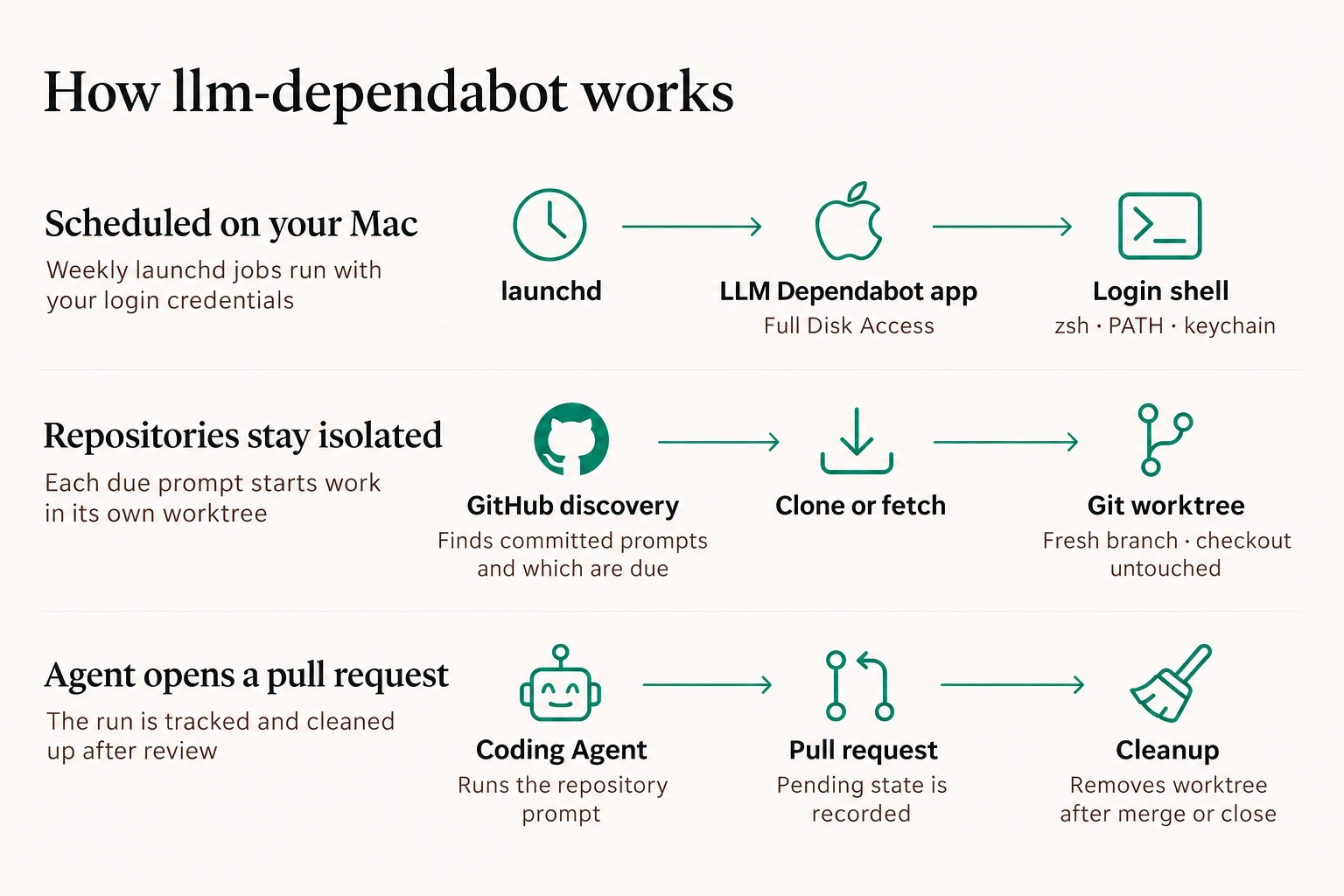
Isolated and tidy: every prompt runs in its own git worktree and branch, and clones made just for a run are deleted once their pull request is merged or closed.
-
Your machine, your credentials: the agent,
gh, andgituse the sign-ins you already have; there is no hosted service and no stored secret.
I use it to maintain my own open-source repositories: web applications, Python and R packages, and everything else. They receive dependency updates every week (every month for R packages), once a month a pass that simplifies the code with what the updated dependencies now offer, and, for websites, a monthly pass that fixes what Google Search Console reports.
Build your own
llm-dependabot is meant to be forked and configured to suit you:
-
Your repositories: set the GitHub account, the prompts and how often they run, and the groups and their weekdays in
config.yaml. -
Your coding agent: any agent with a non-interactive mode works, such as Antigravity CLI (the one configured here), Claude Code, Codex CLI, or GitHub Copilot CLI.
-
Your operating system: the scheduling and tooling are macOS's (
launchdand Homebrew); on another system, swap in its scheduler and package manager.
Important
The repositories you maintain must carry what the agent needs: a committed
prompt for each kind of maintenance, guidance such as an AGENTS.md, and
checks (tests, linters, and CI) that it can run to verify its changes.
The giga factory is only as reliable as each repository's own software
factory; see what a repository needs.
See Forking and adapting for what to change.
Quick start
Note
As configured here, llm-dependabot runs locally and on macOS only, by design. Running agents on your own machine is safer: they reuse your existing sign-ins, so no credentials need to be stored in CI. And as a personal project, it targets the only machine I develop on. Fork the template to adapt it to another operating system, or even to run in the cloud.
# Create from the template (recommended):
gh repo create my-dependabot --template IndrajeetPatil/llm-dependabot --clone
cd my-dependabot

# Or by forking:
gh repo fork IndrajeetPatil/llm-dependabot --clone
cd llm-dependabot

# Run interactive setup:
make setup
make setup interactively installs what is missing from Homebrew, signs you in
to GitHub and your coding agent, sets the account whose repositories it
maintains, asks which private repositories to include, and loads the schedule.
If you wish to use a coding agent other than Antigravity CLI, or your
repositories live outside ~/Documents/GitHub, update config.yaml and the
Brewfile before running setup. See
Setup for the step-by-step
guide to configuring the template, onboarding your repositories, and verifying
the installation.
Documentation
The full documentation is at https://www.indrapatil.com/llm-dependabot/.
| Guide | Covers |
|---|---|
| Setup | Requirements, repository creation, configuration, make setup, Full Disk Access, repository onboarding, and verification |
| Configuration | The coding agent, prompts and their cadences, the schedule, and adapting a fork |
| Usage | Everyday commands, logs, files on disk, and troubleshooting |
| Autonomous evolution | Self-healing prompts, strict quality gates, guidance that learns from mistakes, and what a repository's own software factory needs before it can take part |
| Architecture | How a run works and why it is built this way |
| Development | Toolchain, checks, CI, and the documentation site |
| LLMs | The documentation in the llms.txt format |