Usage
Once set up, nothing needs doing: each group runs on its weekday, running the prompts that are due, and pull requests appear in the repositories. Review and merge them as usual; clones made for a run are deleted once their pull request is merged or closed.
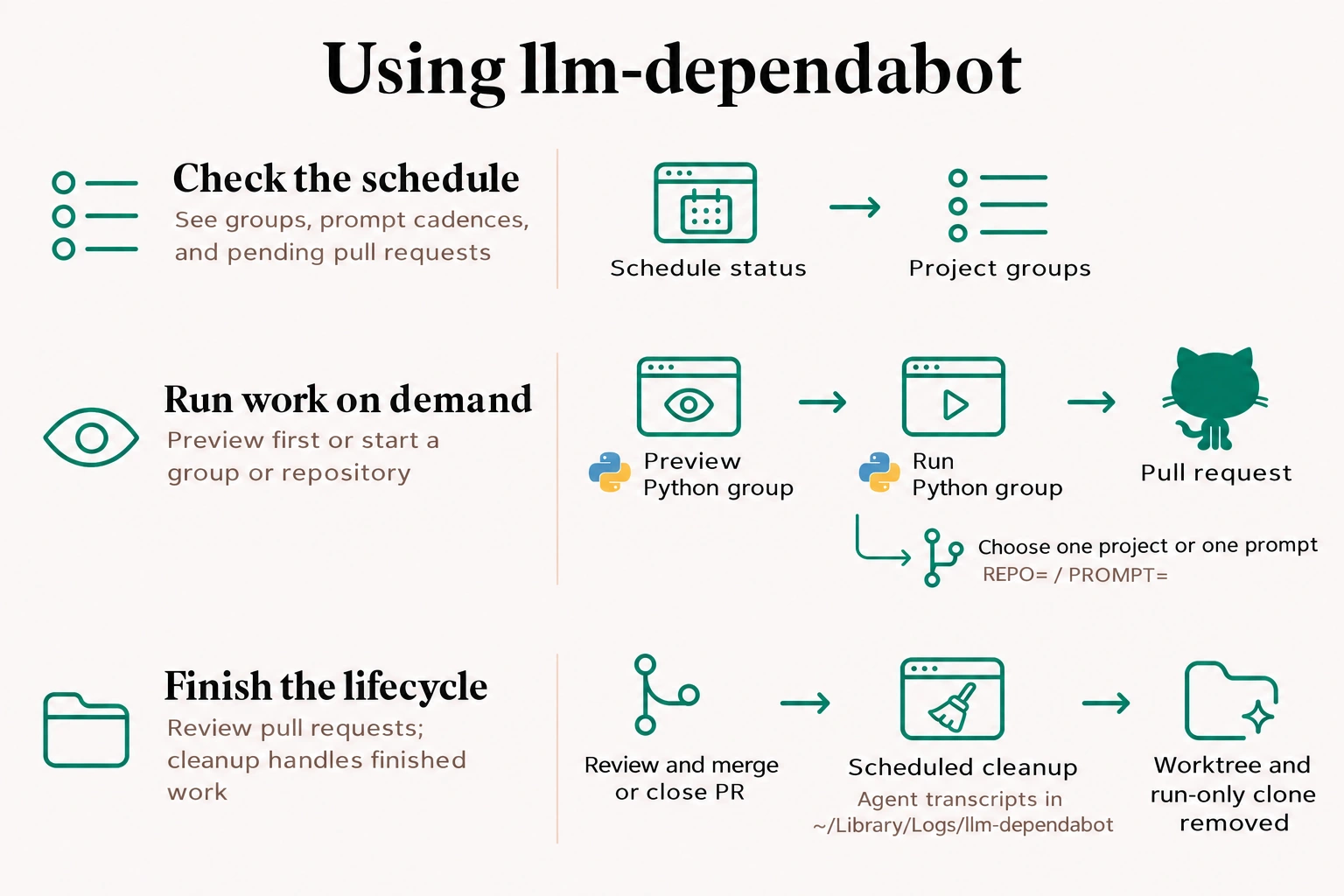
Commands
make help lists every target. The everyday ones:
| Command | Does |
|---|---|
make status |
Show the schedule, each group's prompt cadences, pending pull requests, and clones awaiting deletion |
make list |
Show which repositories fall into which group, and which prompts each has |
make dry-run GROUP=python |
List the repositories and prompts a group would run, without running anything; add PROMPT=<name> to preview one prompt |
make run GROUP=python |
Run a group's due prompts now |
make run GROUP=python REPO=my-project |
Run one repository's due prompts now |
make run GROUP=python PROMPT=simplify-codebase |
Run one prompt now, whatever its cadence |
make cleanup |
Clean up after merged or closed pull requests now |
make clean-logs |
Delete logs older than 30 days; set DAYS=<n> to change the cut-off |
make install |
Reload the agents after editing the configuration |
Except for make clean-logs, each everyday target wraps ./llm_dependabot.py,
which also works directly (./llm_dependabot.py --help).
make run without PROMPT runs what a scheduled run would: every weekly
prompt, and each monthly prompt that has not yet run in that repository this
calendar month. Every completed run counts towards the cadence, so a monthly
prompt run by hand does not run again that month.
When jobs run
-
A job missed while the Mac was asleep runs as soon as it wakes, unless that is a Saturday or Sunday (see
skip_weekendsin Configuration). -
A job missed while the Mac was shut down is skipped until the following week, when monthly prompts that did not run catch up; use
make runto catch up sooner. -
caffeinatekeeps the Mac from idle-sleeping during a run, and a lock stops runs from overlapping. -
A cleanup job runs at login and every
cleanup_interval_hours, except at weekends. -
A notification summarises each run when it finishes.
Watching a run
In Activity Monitor, choose View › All Processes, Hierarchically and search
for the agent's process (for example, antigravity for Antigravity CLI). A
run looks
like this:
LLM Dependabot
└─ zsh
   └─ uv
      └─ python        llm_dependabot.py run GROUP
         ├─ caffeinate keeps the Mac awake during the run
         └─ the agent  whichever config.yaml names
            └─ git, gh, uv, pnpm, Rscript, …  tools the agent runs
The agent's CPU and memory use rise and fall as it edits files and runs each
repository's checks. Quitting LLM Dependabot, the top process, stops the
whole run. Each agent's own output goes to its transcript,
~/Library/Logs/llm-dependabot/<date>-<time>-<group>/<repository>-<prompt>.log.
Files on disk
| Path | Contents |
|---|---|
~/Library/LaunchAgents/com.indrajeetpatil.llm-dependabot.*.plist |
Generated launchd agents |
~/Library/Logs/llm-dependabot/ |
One log per group and one for cleanup, plus a folder per run with one agent transcript per repository and prompt; kept until make clean-logs deletes them |
~/Library/Application Support/llm-dependabot/ |
State (state.json), concurrency lock, and the LLM Dependabot app (LLM Dependabot.app) |
~/Library/Caches/llm-dependabot/worktrees/ |
Worktrees for in-flight pull requests |
Troubleshooting
| Symptom | Fix |
|---|---|
A job's log shows Operation not permitted |
Grant LLM Dependabot Full Disk Access again; make install checks it |
A repository is missing from make list |
Check a configured prompt is on its default branch and, if private, that private.yaml lists it |
| A monthly prompt did not run | make dry-run GROUP=<group> shows whether it already ran this month; make run GROUP=<group> PROMPT=<name> runs it anyway |
| A run opened no pull request | Read the agent transcript in the run's folder under ~/Library/Logs/llm-dependabot/ |
make install says a job is running |
Wait until it finishes; make status shows the schedule |