Configuration
Two YAML files sit next to the script, and every command reads both. Both are
validated strictly on load: unknown keys are rejected and values are never
converted between types, so a typo fails with a clear message instead of a
silent misconfiguration. Quote times ("11:00"): YAML reads an unquoted
9:00 as the number 540, which fails validation.
| File | Committed | Contents |
|---|---|---|
config.yaml |
yes | Owner, prompts and their cadences, clone directory, coding agent, timeouts, and the schedule |
private.yaml |
no (git-ignored) | Private repositories to include, by name |
Run make install after editing either file.
config.yaml
| Key | Meaning |
|---|---|
owner |
GitHub account whose repositories are considered |
prompts |
The prompts repositories can opt into, and how often each runs (see below) |
clone_root |
Where existing clones are found and missing ones are cloned |
agent |
The coding agent and how to call it (see below) |
agent_timeout_hours |
Upper bound for one repository's agent run |
cleanup_interval_hours |
How often finished pull requests are cleaned up |
skip_weekends |
Whether scheduled jobs do nothing on Saturdays and Sundays (default true) |
groups |
The schedule (see below) |
The coding agent
The agent runs once per repository and prompt, unattended, inside a fresh
worktree. Any agent with a non-interactive mode works; the shipped
config.yaml uses Antigravity CLI:
agent:
  name: Antigravity CLI
  command:
    - agy
    - --dangerously-skip-permissions
    - --print-timeout
    - "{timeout_hours}h"
    - -p
    - "{prompt}"
  check: [agy, models]
| Key | Meaning |
|---|---|
name |
Shown by make setup |
command |
The command line, one argument per item. An argument that is exactly "{prompt}" becomes the prompt's text; without one, the prompt goes to standard input. {timeout_hours} becomes agent_timeout_hours. |
check |
Optional: a command that succeeds once the agent is installed and signed in. make setup waits for it. |
Warning
Nobody is there to approve the agent's actions, so it must be able to edit files, run commands, and push without asking. Give it the same trust you give your own terminal session.
Each agent takes the same shape:
| Agent | command |
check |
|---|---|---|
| Antigravity CLI | [agy, --dangerously-skip-permissions, --print-timeout, "{timeout_hours}h", -p, "{prompt}"] |
[agy, models] |
| Claude Code | [claude, --dangerously-skip-permissions, -p, "{prompt}"] |
[claude, auth, status] |
| Codex CLI | [codex, exec, --dangerously-bypass-approvals-and-sandbox, "{prompt}"] |
[codex, login, status] |
| GitHub Copilot CLI | [copilot, --yolo, -p, "{prompt}"] |
— |
Tip
Check the flags against your agent's version; they change between releases.
When switching agents, also replace antigravity-cli in the
Brewfile with your agent's package. A run that outlasts
agent_timeout_hours by ten minutes is stopped, so agents without a timeout
of their own are bounded too.
Prompts and cadence
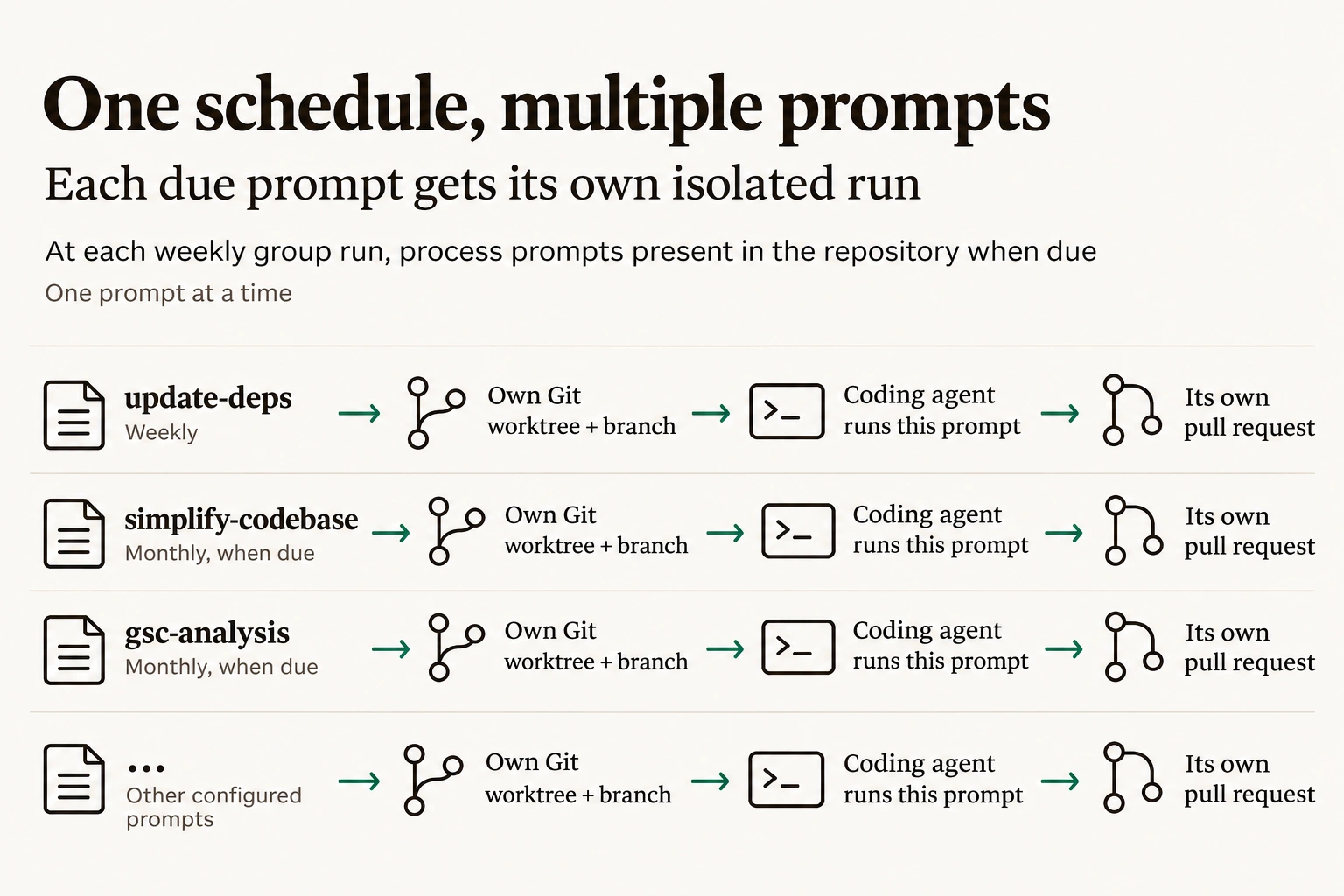
Each prompt is a file that repositories opt into by committing it at path.
It runs verbatim, in its own worktree and branch (chore/<name>-<timestamp>),
so each prompt opens its own pull request.
prompts:
  - name: update-deps
    path: .github/prompts/update-deps.md
    cadence: weekly

  - name: simplify-codebase
    path: .github/prompts/simplify-codebase.md
    cadence: monthly

  - name: gsc-analysis
    path: .github/prompts/gsc-analysis.md
    cadence: monthly
| Key | Meaning |
|---|---|
name |
Identifies the prompt in cadence overrides, branch names, logs, and make run PROMPT=…; letters, digits, ., _, and - only |
path |
Path of the prompt inside each repository |
cadence |
weekly (the default) or monthly; a group can override it |
-
Weekly prompts run at every scheduled run of the repository's group.
-
Monthly prompts run at the group's first scheduled run in each calendar month.
state.jsonrecords when each prompt last ran in each repository, so a monthly prompt whose run was missed, skipped, or failed runs at the group's next scheduled run instead of waiting a month.
Groups and the schedule
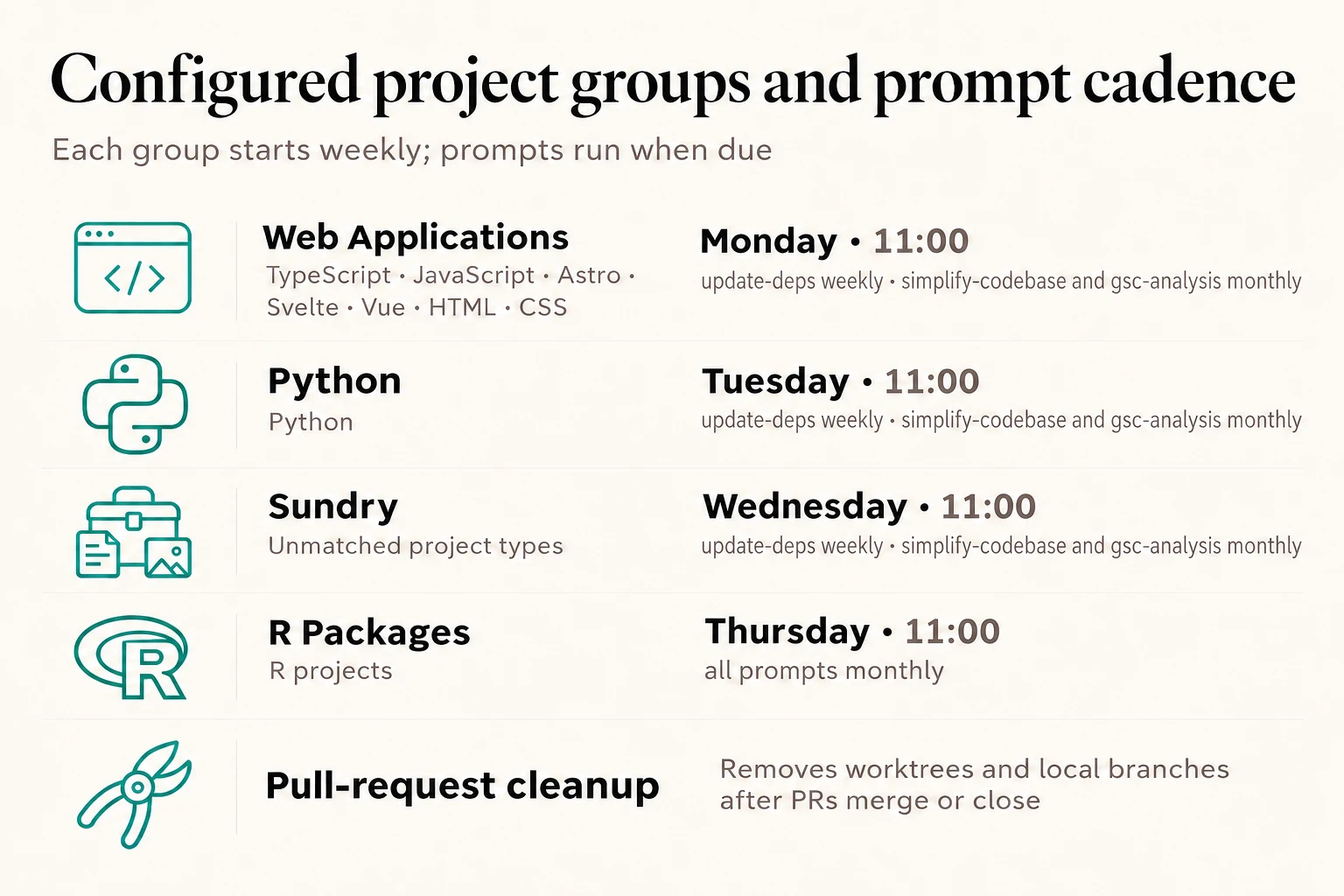
Each group runs at a local wall-clock time on one weekday, and may override a prompt's cadence:
A repository joins the first group whose languages include its GitHub
primary language. The group with languages: ["*"] takes everything else.
The default schedule, with nothing on Fridays or at weekends:
| Group | Languages | Day | update-deps |
simplify-codebase and gsc-analysis |
|---|---|---|---|---|
web |
TypeScript, JavaScript, Astro, Svelte, Vue, HTML, and CSS | Monday 11:00 | weekly | first Monday of the month |
python |
Python | Tuesday 11:00 | weekly | first Tuesday of the month |
workflows |
anything not matched by another group | Wednesday 11:00 | weekly | first Wednesday of the month |
r |
R | Thursday 11:00 | first Thursday of the month | first Thursday of the month |
With skip_weekends: true, groups cannot be scheduled on a Saturday or
Sunday, and a scheduled job that launchd starts late at a weekend (for
example, after the Mac wakes) does nothing. Weekly prompts then wait for the
following week, and monthly ones for the group's next scheduled run.
Which repositories take part
-
Public: every non-archived, non-fork public repository owned by
ownerthat contains at least one of the prompts, found automatically at run time. -
Private: only those listed in
private.yaml, so their names never reach version control. Each still needs at least one of the prompts.
A repository runs only the prompts it contains. One that gains a prompt picks
it up at its group's next scheduled run that finds the prompt due.
make list shows the current assignment. See
Prepare your repositories for
guidance on committing prompts and onboarding projects.
private.yaml
make setup writes it for you. To edit it by hand, copy
private.example.yaml:
Without private.yaml, only public repositories run. A git hook rejects any
commit that adds this file or names one of its repositories.
Forking and adapting
llm-dependabot is designed as a template: create a new repository from it or fork it, and adapt the configuration for your own projects.
| To change | Edit |
|---|---|
| Whose repositories take part | owner in config.yaml (make setup offers to set it), and private.yaml |
| Which prompts run, and how often | prompts, and per-group cadence, in config.yaml |
| The schedule | groups in config.yaml |
| The coding agent | agent in config.yaml, and its package in the Brewfile |
| Where clones live | clone_root in config.yaml |
Important
The agent can only be as good as what each repository gives it: a
committed prompt for each kind of maintenance, guidance such as an
AGENTS.md, and checks (tests, linters, and CI) that it can run to verify
its changes. A repository without a prompt is never touched.
The giga factory is only as reliable as each repository's own software
factory; see what a repository needs.
See Setup for the end-to-end walkthrough on initialising the repository, configuring your coding agent and clone directory, running interactive setup, and testing your installation.
What comes with the template
The scheduler needs only llm_dependabot.py and its lockfile, config.yaml,
private.example.yaml, app/, hooks/, prek.toml, the Makefile, and
the Brewfile, plus pyproject.toml and uv.lock for the Ruff and ty
configuration and the docs tooling. The rest serves this repository's own
documentation, branding, and CI:
| Files | In your copy |
|---|---|
.github/workflows/ |
Self-contained CI that runs in any account; docs.yml deploys the site from main, so set Settings › Pages › Source to GitHub Actions or delete it |
docs/, mkdocs.yml, and overrides/ |
The documentation site; mkdocs.yml sets this site's URL and Google Analytics property, and overrides/main.html names its author. Change them before deploying the site, or delete them with docs.yml and the docs targets in the Makefile |
.github/prompts/ |
This repository's own maintenance prompts; keep them so llm-dependabot maintains your copy |
hextools/, DESIGN.md, and .agents/ |
Branding and figure generation; delete them, or keep them to draw your own |
app/icon.png is the app's icon; replacing it rebuilds the app, which needs
Full Disk Access granted again.
Another operating system
The scheduling and the tooling are macOS's. Everything else (discovery,
worktrees, running the agent, pull-request tracking, and cleanup) is plain
git, gh, and Python. To run elsewhere, replace these parts of
llm_dependabot.py:
| macOS part | Role | Replace with, for example |
|---|---|---|
launchd agents (launchctl) |
Start each group's run and the cleanup on schedule | systemd timers or cron on Linux, Task Scheduler on Windows |
The LLM Dependabot app (app/) |
Holds the Full Disk Access grant | Nothing, where the OS has no such protection |
caffeinate |
Keeps the machine awake during a run | systemd-inhibit on Linux |
osascript notifications |
Summarise each run | notify-send on Linux, or nothing |
Homebrew and the Brewfile |
Install the tools | The system's package manager |